
Your website is your law firm’s digital front door. It’s where first impressions are made, trust is built, and prospective clients decide whether to contact you or keep moving.
In our Internet-driven world, having a professional website is a non-negotiable for law firms. But building a truly effective legal website means more than just choosing a nice-looking template and dropping in a few bios.
It requires strategic planning, legal compliance, thoughtful design, and a deep understanding of how prospective clients use the web to find and vet attorneys.
Whether you’re a solo practitioner just starting out, or a well-established firm looking to modernize, your website should be doing the heavy lifting: attracting qualified leads, answering common questions, showcasing your expertise, driving conversions and, ultimately, making you money.
With increasing competition, evolving technology, and heightened expectations around accessibility and data security, it’s more important than ever to get it right.
In this guide, we’ll walk you through the essential elements of building a high-performing law firm website.
Do I Need a Website for My Law Firm?
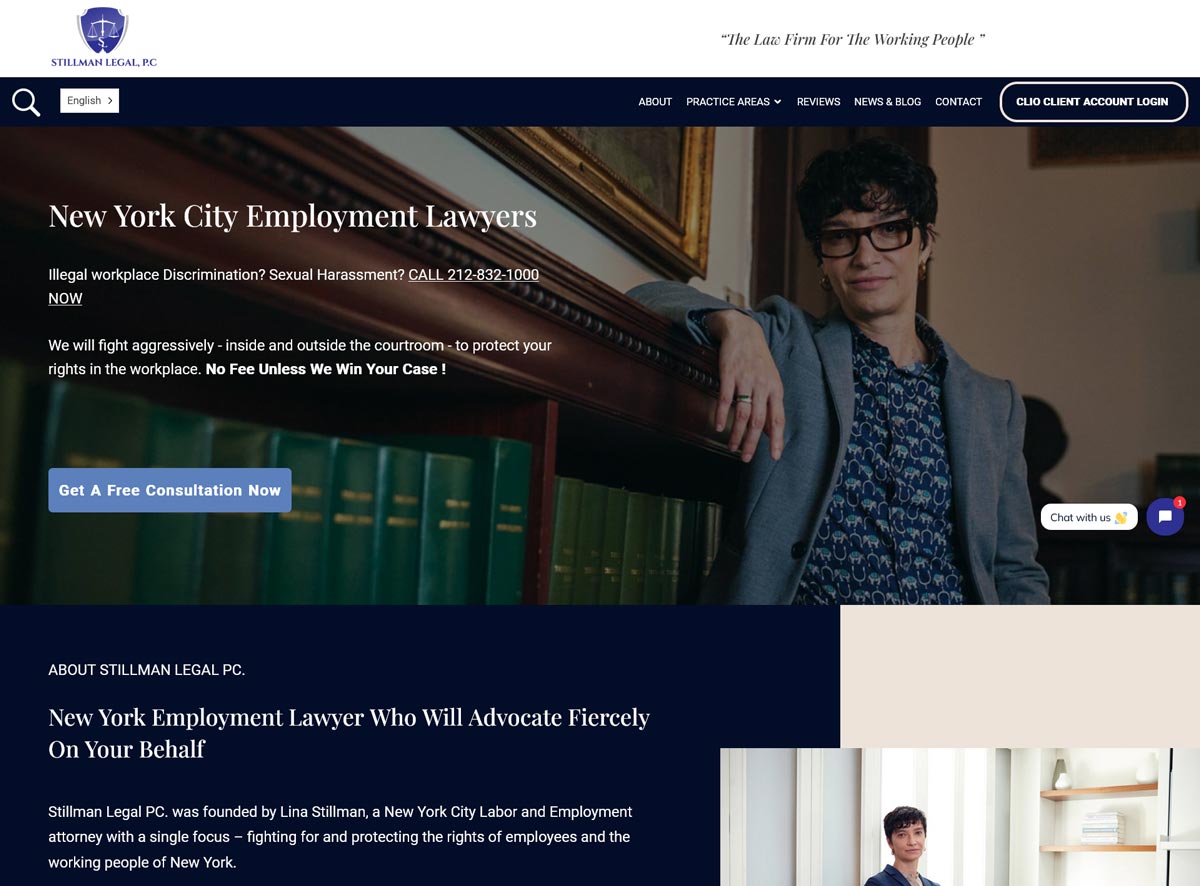
A well-built, professional law firm website
Yes you do. In today’s digital-first world, the vast majority of prospective clients search online when seeking legal help.
While there are many places online where clients could encounter you while conducting a search (social media platforms like Instagram, TikTok, YouTube, LinkedIn, and a variety of legal directories like Justia and FindLaw, to name a few), a polished, professional website will always serve to validate your practice, establish your credibility and, consequently, directly impact your bottom line.
Your legal website will serve as the central source of truth and information for your law practice. While you could actively promote your content and messaging on other platforms like social media, directories, and networking sites, your own website will be the only digital platform where you control your messaging and choose how to present yourself and your practice.
All other platforms will dictate what you can say and how you can operate, and ultimately could remove or limit your account at any time, for any reason. There is also the distinct possibility of any one of these platforms going out of business or being suddenly shut down or censored [e.g. recent threats to TikTok’s status in the US], at which point, any work you’ve done to market yourself and build a network could suddenly disappear.
While it’s important to leverage as many relevant digital platforms (social media, LinkedIn, legal directories, etc.) to disseminate your content and build awareness for your brand, it is risky to rely solely on them for your business’s digital footprint.
Some lawyers understand this reality and are seeing the benefits of building a solid website as the foundation of their digital presence.
Julia Rueschemeyer of Attorney Julia Rueschemeyer Divorce Mediation is one of them. “I am a solo practitioner divorce mediator and my website IS my business,” she says. “Over 90% of my clients learn of me and contact me through the website,”
Moreover, even when prospective clients discover you through channels beyond search engines, your website serves as the definitive touchstone for establishing your credibility and worthiness of their patronage.
Loyd Bourgeois, a Louisiana personal injury attorney and the founder of Loyd J Bourgeois Injury & Accident Lawyer, underscores this essential truth. “Even when a potential client hears about you through word of mouth, community involvement, or traditional advertising, they almost always look you up online before calling,” he offers. “They want to find your phone number, read reviews, make sure you can handle their type of case, and feel like the right fit. A professional, trustworthy online presence helps confirm that decision.”
Besides serving to help you build authority and trust and demonstrate your expertise, a well-built website will help you capture leads and conduct business, even when the office is closed. It can also help you outperform your competitors online, especially those relying on outdated or DIY sites.
Amit Agrawal, Found & COO of Developers.dev, puts it this way: “As a baseline, clients expect law firm websites to engage with them interactively with 24/7 immediacy! They no longer tolerate ‘submit a form and wait 24 hours’ workflows. Legal consumers expect the online journey to begin by addressing their specific legal question-their expectation baseline is to feel recognized the second they land on the page.”
Strategic Planning for a Legal Website: Goals, Target Audience & Branding
Define Objectives
A successful legal website is more than just a brochure. Before diving into design and development, take time to clearly outline the purpose of your website.
Whether you’re building your first website or refreshing an old one, setting clear goals at the outset will help to guide every decision that follows: structure, functionality, content, and calls to action.
Ask yourself:
- Are you primarily collecting email leads, booking consultations, showcasing case wins, or providing resources?
- Do you need to highlight specific or niche legal services (e.g., family law, immigration law, intellectual property)?
- Are you trying to attract a certain type of client or case?
- Will your site serve as a content hub or thought leadership platform?
Your answers will determine the shape and structure of your site. For example, a lead-generation-focused site may prioritize quick calls to action (CTAs) and simplified intake forms, while a content-driven site will need space for blog archives, FAQs, and educational resources.
Understand Your Ideal Client
It’s important to understand that your website is not for you, it’s for your clients, current and prospective. To build a site that resonates, you need to deeply understand who your ideal clients are, what they need, and how they search for legal help. Your website must meet their needs.
This isn’t just a marketing exercise, it’s the foundation for everything from your site’s tone and brand to your navigation and service structure. The more clearly you can define your ideal client, their needs, their emotional state when looking for you, to name just a few important considerations, the more effectively your website will speak to them.
Ask yourself:
- Who do you serve: individuals, families, small businesses, or corporations?
- What are their most pressing legal problems, concerns, and questions?
- Are they in your city, or searching across jurisdictions?
- What do they value most in a lawyer: experience, cost transparency, speed, empathy?
- What kind of tone, imagery, and language might feel familiar and trustworthy to them?
Clarifying your audience allows you to make client-centric design and content decisions.
For example, if your ideal client is a stressed-out parent seeking a custody lawyer, your homepage tone, color palette, and copy should feel reassuring and compassionate, not cold and corporate. If you serve startups, the design might lean more modern and sleek, with streamlined navigation.
Understanding your target audience also informs your SEO and content strategy. You’ll know what questions to answer, what keywords to target, and how to position your services in a way that meets your audience where they are.
Craft Your Brand
Your brand is more than a logo – it’s the overall impression your firm leaves on potential clients. A strong brand reflects your values, communicates your professionalism, and visually reinforces your expertise and trustworthiness.
In a crowded legal market, intentional branding helps distinguish you from competitors and builds credibility before a client ever picks up the phone.
Your visual and verbal brand should remain consistent across your website. This includes:
- Logo and color palette. Choose a clean, high-resolution logo and color scheme that reflects your practice (e.g. calm and approachable for family law, bold and assertive for criminal defense).
- Typography and layout. Use modern, readable fonts and layouts that reflect professionalism and clarity. Avoid visual clutter.
- Tone. Whether your messaging is formal and authoritative or warm and conversational, make sure it aligns with the client base you’re trying to attract.
- Photography and imagery. Use authentic images that show your team, your workspace, or your city, as opposed to generic stock photos or legal clichés like gavels and courthouse steps.
- Mission and values. Make sure your brand communicates why you do what you do. People hire people they trust, and trust begins with a sense of shared values.

Example of a great logo and branding asset for a Law firm
Consistency across all these elements reinforces your legitimacy and builds trust at every touchpoint.
Your brand is your reputation. Make sure it’s working for you from the moment someone lands on your site.
Must-Have Website Features for Lawyers
Must Have Site Pages
Based on recommendations from the American Bar Association, your site should feature some version of the following pages:
Homepage
Your homepage should immediately communicate who you are, what you do, and why you’re the best choice, with no scrolling and limited reading required. Use a bold headline statement, your firm’s name, and a clear value proposition (e.g. “Helping families navigate divorce in Philadelphia”).
Incorporate high-quality, authentic images and limit text above the fold (the part of your webpage that is visible on the screen without scrolling) to key benefits and strong calls-to-action (e.g. “Schedule a free consult”). Prioritize speed (fast-loading pages), clean whitespace, and mobile responsiveness. Clients will decide within moments whether to stay.
Practice Area/Services
Dedicate a separate page to each practice area (e.g., “Estate Planning”, “Personal Injury”) to provide depth and boost SEO performance, if your firm practices in more than one area of law. Include localized keywords, like “New Jersey real estate lawyer”, to improve visibility in local search results. Structure each page with clear headlines, client-focused messaging (e.g., “We’ll guide you through probate step-by-step”), FAQs, and transparency (i.e., pricing) when possible.
Attorney Bios
Help visitors connect with your team by featuring professional headshots and concise biographies.
Beyond listing credentials and experience, add short personal anecdotes or values to showcase personality and build rapport before contact is made.
Reviews / testimonials
Incorporate client testimonials throughout your website, either on a dedicated “Reviews” page or sprinkled strategically on high-traffic pages like your homepage, practice area pages, or contact page. Authentic feedback builds trust and reinforces your competence. Use real quotes from public sources like Google or Yelp, and always get written permission before sharing private client comments. Highlight reviews that speak to your professionalism, responsiveness, and results.
Social Proof Beyond Testimonials
Client testimonials are powerful, but they’re not the only form of social proof that can strengthen your website’s credibility. In fact, some of the most persuasive trust signals aren’t quotes from clients at all — they’re contextual indicators that show your firm is active, recognized, and respected.
Consider incorporating the following:
- Case results and outcomes. Where ethical rules permit, sharing notable case results (e.g., “Secured a $2.1M settlement for a client injured in a construction accident”) provides concrete evidence of your effectiveness. Always include appropriate disclaimers that past results don’t guarantee future outcomes.
- Media mentions and publications. If you’ve been quoted in a news article, contributed to a legal publication, or been featured on a podcast or webinar, showcase it. This kind of third-party validation is extremely persuasive because it demonstrates that people outside your firm recognize your expertise.
- Awards and recognitions. Bar association honors, Super Lawyers selections, Best Lawyers listings, and community awards all reinforce your standing in the profession. Display these prominently, but don’t overdo it — a curated selection of your most meaningful recognitions is more impactful than a wall of badges.
- Client count or years of experience. Simple, factual statements like “Over 500 families helped through the divorce process” or “Serving small businesses since 2004” give visitors a quick measure of your track record without requiring them to read a full testimonial.
The goal is to surround your visitor with evidence, from multiple angles, that your firm is trustworthy and competent. Each of these elements works together to lower the psychological barrier between “browsing” and “calling.”
About Page
Your “About” page is where you demonstrate authenticity. Offer a narrative of your firm’s origins, core values, and mission. Some guiding questions could include: why do you practice law? Who do you serve? What makes you unique?
Pair storytelling with measurable outcomes and accomplishments, such as awards, bar memberships, or community work. Prioritize engaging and client-centric language, rather than internal jargon.
Contact Page
Make contacting your firm effortless. Clearly display phone, email, and physical address, embed a map, and list office hours prominently. Consider adding an intake form for streamlined lead capture. Ensure the contact page is visible via the main menu and header.
Blog/Resources
Regularly update a blog or resource section with articles that answer common client questions, for example: “What happens if I miss my court date?”. This builds authority, aids SEO, and keeps your content fresh. Use targeted keywords, internal linking to service pages, meta descriptions, and alt text to improve SEO performance (read more about the importance of SEO for lawyers here). Establish a consistent posting schedule and leverage content across email newsletters and social channels.
Important Functional Elements
- Clear calls to action (CTAs), e.g. “Schedule a Free Consult,” “Speak to a Lawyer”, “Request a Case Evaluation” etc.
- Contact forms & chat widgets as part of conversion optimization
- Client testimonials & case results to demonstrate proved effectiveness
- Privacy policy & disclaimers for compliance and trust
- Optional: live chat or chatbots to help capture visitors instantly
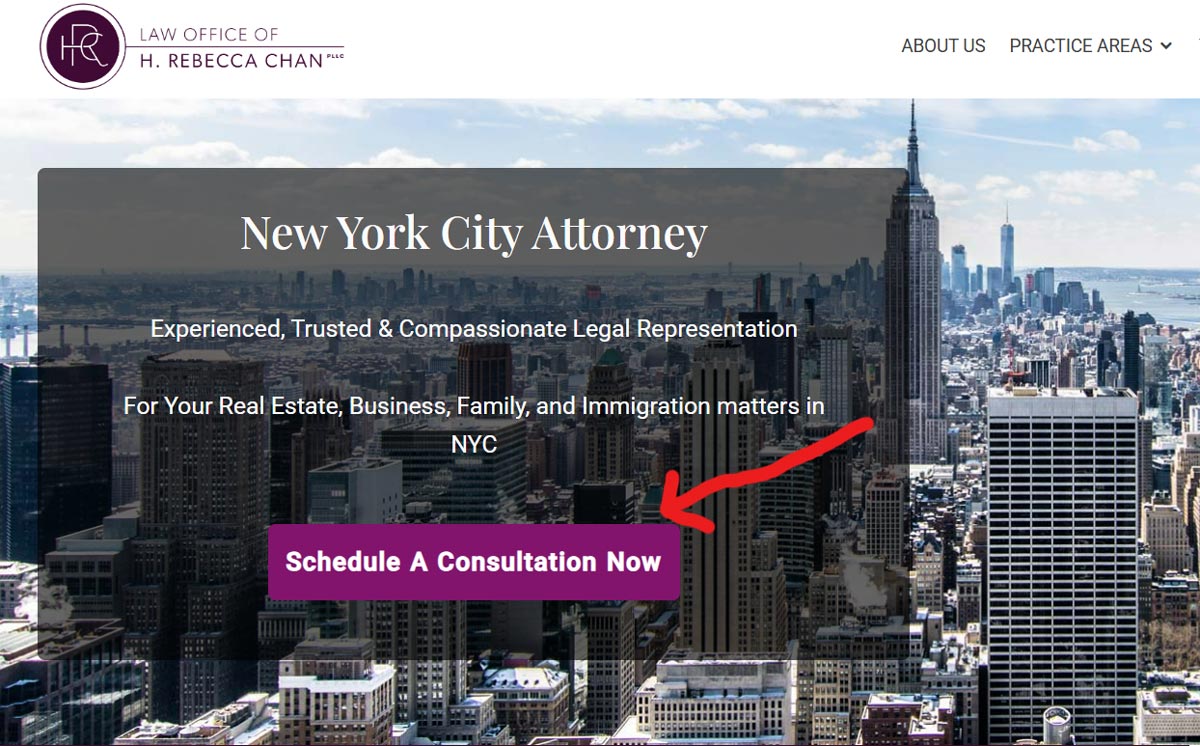
Example of a clear call to action for a Law firm website
Design and User Experience (UX) Best Practices for Legal Websites
A law firm’s website should be intuitive, visually clean, and easy to navigate. Poor UX leads to lost clients, especially when a competitor’s site is only a click away.
Your design choices directly impact how potential clients perceive your credibility and professionalism. Below are core UX and design principles that will ensure your site not only looks good but performs well too.
Clean, Simple Layout
In legal web design, less is more. A cluttered or overly complex layout can overwhelm visitors and reduce trust. Clean, minimalist design communicates clarity, competence, and professionalism.
Navigation & F Pattern Flow
Visitors tend to scan websites in an “F” pattern, starting at the top left and working their way down and across. Your site structure should work with this natural reading behavior, not against it.
Clear, top-level navigation helps users quickly find what they’re looking for, and placing important calls to action in predictable places (like the top right) improves engagement.
Mobile First & Responsive
More than half of legal searches now happen on mobile devices. If your site isn’t optimized for mobile, you risk losing potential clients before they read your first sentence. A mobile-first approach means designing your website with smartphones in mind from the beginning, rather than adapting a desktop version later.
Responsive design ensures that your website automatically adjusts its layout, text size, and images based on the screen size of the device being used. Whether someone visits your site from a phone, tablet, or desktop computer, they should have a seamless and functional experience.
Visual Elements & Branding
Your website’s visuals tell your firm’s story before a visitor reads a single word. Authentic, high-quality images (e.g. professional headshots of you and your team) combined with intentional branding can build immediate trust and create emotional connection. Avoid generic stock photography and legal clichés, and instead showcase your team, workspace, or community.
Readability & Scannability
Most users don’t read web pages word-for-word, they scan for key points. To keep visitors engaged and help them find what they need, your content must be broken into digestible sections.
Use a legible font size (at least 16-point), maintain plenty of whitespace to reduce visual fatigue, and use clear headings to organize content. Structuring your copy for readability not only improves user experience but also supports better SEO and higher engagement.
Conversion Rate Optimization (CRO)
Getting visitors to your site is only half the battle. The other half is getting them to take action: call your office, fill out an intake form, book a consultation, or download a resource.
And the numbers here should get your attention. According to a widely cited study by WordStream, the average landing page conversion rate across all industries is just 2.35%. For law firms specifically, the picture is only marginally better: Ruler Analytics reports that the average conversion rate in the legal industry sits at around 2.6%, though top-performing legal websites convert at rates of 15% or higher.
Put differently, on a typical law firm website, roughly 97 out of every 100 visitors leave without making any contact at all. For a practice where a single case can be worth thousands — or tens of thousands — of dollars, even a small improvement in that number can have a dramatic impact on revenue.
This is where conversion rate optimization, or CRO, comes in. CRO is the practice of systematically improving your website to increase the percentage of visitors who complete a desired action. It’s not about driving more traffic; it’s about getting more value from the traffic you already have.
For law firms, effective CRO involves a few key principles:
- Reduce friction. Every extra step between a visitor and your contact form is an opportunity for them to drop off. If your intake form asks fifteen questions before someone can hit “Submit,” you’re losing leads. Keep initial forms short. You can always ask for details later once they’ve made contact.
- Use directional cues. Visual elements like arrows, contrasting button colors, and strategic whitespace can guide a visitor’s eye toward your primary CTA. Don’t make them hunt for the “Call Now” button.
- Leverage urgency without being manipulative. Language like “Free consultations available this week” or “Speak with an attorney today” creates a natural sense of timeliness. Avoid high-pressure tactics that feel out of place in a legal context — they erode trust more than they drive clicks.
- Test and measure. Use A/B testing to compare different headlines, button colors, form lengths, and CTA placements. Even small changes — moving a phone number from the footer to the header, for example — can produce measurable differences in conversion rates.
The firms that consistently turn website traffic into signed clients aren’t necessarily the ones with the most traffic. They’re the ones who’ve optimized the journey from “visitor” to “lead” with intentional design and measured iteration.
Content Strategy and SEO for your Legal Website
Even the most visually stunning website won’t generate leads if no one can find it. That’s where a strong content strategy and SEO come into play. These two elements work together to make sure your law firm’s website isn’t just attractive, but discoverable, useful, and aligned with your broader marketing goals.
SEO in the Age of Artificial Intelligence and Generative Engines
Search engine optimization is still the backbone of visibility online. Done right, SEO helps your pages rank higher in search results when someone types in something like “immigration lawyer in Denver” or “how to expunge a record in New Jersey.” That means using the right keywords, structuring your pages properly, earning backlinks, and creating high-quality, relevant content.
But recently, there has been an important shift in SEO: Google is no longer the only gatekeeper.
More and more people are finding legal information, and even getting law firm recommendations, through AI-powered tools like ChatGPT, Perplexity, Bing Copilot, and Google’s Search Generative Experience (SGE). These tools don’t just serve up a list of links, they analyze and summarize content to give users direct answers.
This changes the game.
To ensure your law firm shows up in these emerging search experiences, you need to optimize not just for Google, but for AI systems and Generative Engines as well. That means making your content easy for bots and large language models (LLMs) to crawl, understand, and reference.
A few ways to do that:
- Organize your structure: Use headings (H1, H2, H3), bullet points, and short paragraphs so content is easy to parse.
- Use plain language: AI tools favor content that is direct, well-organized, and jargon-free. Skip the legalese when possible.
- Answer questions directly: Think FAQ-style content. If your site clearly answers, “How much does a divorce lawyer cost in New York?” it’s more likely to be referenced or quoted by an AI agent.
- Add schema markup: This helps both search engines and AI systems understand what your pages are about. It’s extra code behind the scenes that can flag content like reviews, locations, services, and more.
- Keep your content fresh: AI tools prefer recent, updated content. A blog that hasn’t been touched in two years is less likely to be surfaced in a response.
In short, bots are your new front desk. Make it easy for them to understand who you are, what you do, and why you’re credible.
Content Strategy
A content strategy is the process of planning, developing, and managing content (written, visual, or otherwise), so that it serves both your audience and your business objectives.
In practical terms for a law firm, this means making sure your website content answers the kinds of questions potential clients are asking, positions your firm as a trusted authority, and is consistent with everything you’re putting out across other channels (like your Google Business Profile, LinkedIn posts, newsletters, or YouTube videos).
If your blog says one thing, but your website says another, and your social media hasn’t been updated in six months, you’re sending mixed signals. A cohesive content strategy keeps everything aligned, so potential clients hear the same message no matter where they find you.
Investing in content strategy and SEO isn’t about gaming the system, it’s about making sure the right people can find you, trust you, and take the next step toward working with you. As AI-powered tools and Generative Engines become a bigger part of how people search for legal help, building a website that’s easy for both humans and machines to navigate is no longer optional. It’s your new competitive edge.
For a deeper dive into how SEO specifically benefits law firms, read about search engine optimization for law firm websites here.
With regards to the content on your website, it must be relevant, valuable and helpful to your potential clients. It must answer the important questions they have about their legal issue and give them a reason to trust you as a legal solutions provider.
Eric Lamanna, VP of Sales at Law.co states it very clearly:
“Content still matters, but not fluff. Practice area pages that actually explain scenarios, outcomes, and timelines perform far better than generic copy. FAQs written in plain language work incredibly well. Attorney bios that sound like real people instead of resumes build trust fast. Educational content that answers real questions shows experience without bragging.”
Divorce mediation attorney, Julia Rueschemeyer, employs this approach of providing abundant, helpful, content and has seen that drive client acquisition for her firm.
“I create all legal content in-house and give away detailed divorce guidance, including complex financial calculators, which has driven strong search rankings and helped us outperform larger firms with bigger budgets,” she explains. “Because I give away so much practical, helpful, clear information for free — the words ‘this is a complicated legal matter that you should discuss with legal counsel’ will never appear on my site — people are attracted to my site and they hire me for their divorces.”
Keeping all content updated and relevant to changing laws and the local markets that you serve is also extremely important. This positions your website and your firm as a trusted resource for legal matters.
Jonathan Steele Esq., Family Law Partner & Cybersecurity Expert at Beermann LLP very succinctly sums up what the content goals of a legal website should be: “Your website should answer three questions immediately: What do you do? Can you help me? How do I reach you right now? Everything else is noise.”
Marketing Strategist, Austin Benton with Gotham Artists agrees. “Your website needs to convert urgency into action fast. People searching for lawyers typically have immediate problems and limited patience,” he explains. “Every second of confusion costs you a client.”
Keyword Research & Targeting
The primary driver of organic traffic is SEO. At its core, SEO involves identifying the words and phrases your potential clients are using in search engines and understanding the types of questions they ask when they search for lawyers like you, and then integrating answers to their questions naturally into your website content.
Make sure to include specific keywords that reflect both your services and your location. For example, “New Jersey real estate lawyer” or “Boston immigration attorney.” Use these terms in your page titles, headers, meta descriptions, image alt text, and body content for the best results. For a deeper dive into the topic, learn how to conduct key word research for your law firm.
Blog & Resources
Maintaining a regularly updated blog boosts SEO and helps establish your firm as a knowledgeable authority. Blogging allows you to target long-tail keywords (e.g. “What happens after a DUI arrest in California?”), answer frequently asked questions, and address timely legal issues.
A consistent publishing schedule and a professional editorial voice are key. A blog also provides content to repurpose in email newsletters, social media, and Google Business Profile posts, to name a few examples.
Ethical & Trustworthy Content
Lawyers are held to a higher standard when it comes to the accuracy and ethics of their marketing. All content on your site should comply with the American Bar Association’s as well as any local bar’s rules and advertising guidelines.
Avoid exaggerated claims, misleading language, or generic, AI-generated content that lacks originality and nuance. Instead, prioritize well-researched, human-written material that reflects your real-world experience and legal perspective.
Your potential clients will notice the difference.
Using AI to Generate Content for Your Legal Website
It would be impossible to write a guide about legal website content today without addressing the elephant in the room: artificial intelligence.
AI writing tools like ChatGPT, Claude, Gemini, and others have fundamentally changed the content landscape. They can produce blog posts, practice area descriptions, FAQ pages, and even attorney bios in minutes. For time-strapped lawyers running a practice and trying to maintain a content calendar, the appeal is obvious. Why spend hours writing a blog post when an AI tool can draft one in thirty seconds?
But before you hand the keys to your website’s content over to a chatbot, there are some important realities you need to understand — both about what AI can do well and where it can go dangerously wrong, especially in the legal profession.
The Case for Using AI
Let’s be fair: AI tools, when used responsibly, can be genuinely useful for legal content creation. They can help you brainstorm topic ideas, create rough outlines, draft initial versions of blog posts, summarize complex concepts, and overcome writer’s block. For firms that would otherwise publish nothing at all because they don’t have the time or resources to write from scratch, AI can serve as a starting point that gets the content process moving.
AI can also be useful for tasks that are more structural than substantive — generating meta descriptions, rephrasing existing content for different audiences, drafting social media posts based on a blog article, or creating first drafts of FAQ pages that a lawyer then reviews and refines.
Google itself has clarified its position on AI content. In their official guidance on AI-generated content, Google stated that it focuses on “rewarding high-quality content, however it is produced.” In other words, Google doesn’t inherently penalize content because it was created with the help of AI. What it penalizes is low-quality content — thin, unoriginal, unhelpful material that exists primarily to manipulate search rankings rather than serve users. That standard applies whether the content was written by a human, an AI, or some combination of both.
So, AI isn’t off the table. But how you use it matters enormously.
The Risks of Using AI for Legal Content
Here’s where things get serious. Legal content is not like content in most other industries. It carries real-world consequences. A blog post about the best coffee makers can afford to be a little generic. A blog post about child custody laws in your state cannot. If the information is wrong, outdated, or misleading, it doesn’t just hurt your SEO. It could harm someone making life-altering decisions based on what your website told them. And it could expose your firm to ethical complaints, disciplinary action, or worse.
Here are the specific risks every lawyer and law firm should understand before publishing AI-generated content:
Accuracy and “Hallucinations”
AI tools are known to “hallucinate,” which is the industry term for when an AI confidently presents information that is completely fabricated. This includes inventing case law citations, misstating statutes, citing outdated rules, or manufacturing facts that sound plausible but don’t exist. For general interest topics, this might be an inconvenience. For legal content, it’s a minefield.
There have been multiple, well-documented cases of attorneys submitting AI-generated court filings that contained fabricated case citations. These lawyers faced sanctions, fines, and public embarrassment — not because they used AI, but because they failed to verify what it produced. The same risk exists with your website content. If your practice area page cites a statute that doesn’t exist, or your blog post misstates the filing deadline for a motion in your jurisdiction, you’ve published misinformation under your firm’s name. And in the eyes of both the public and your state bar, you’re the one responsible — not the AI.
The American Bar Association addressed this directly in its Formal Opinion 512, which outlines ethical guidelines for lawyers using generative AI. The opinion makes clear that existing duties of competence, diligence, and supervision apply fully to AI-assisted work. You cannot delegate your professional obligations to an algorithm.
Plagiarism and Copyright Concerns
AI models are trained on enormous datasets of existing content, and they can sometimes reproduce or closely paraphrase copyrighted material without attribution. When that material shows up on your website as if it were original writing, you’re potentially exposing your firm to plagiarism accusations and copyright infringement claims — even unintentionally.
This is especially relevant as major copyright lawsuits involving AI training data work their way through the courts. The legal landscape around AI-generated content and intellectual property is still evolving, and firms that blindly publish AI output without checking it for originality are taking a risk that is, frankly, unnecessary.
Run any AI-generated content through a plagiarism checker before publishing it. Tools like Copyscape, Grammarly, and Originality.ai can help identify passages that too closely mirror existing published content. This step takes minutes and can save you from a significant headache down the road.
Generic, Undifferentiated Content
One of the most practical problems with AI-generated legal content is that it tends to sound like everyone else. AI tools draw from the same pool of training data, which means the output often reflects the most common, generic version of whatever topic you ask about. If you prompt an AI to write a blog post about “what to do after a car accident,” the result will likely read almost identically to dozens of other AI-generated posts on the same subject across hundreds of other law firm websites.
That defeats the entire purpose of having content on your site. Your content is supposed to differentiate you — to demonstrate your specific expertise, your voice, your perspective, your understanding of local laws and local courts. Generic AI output does none of that. It fills space without adding value, and both search engines and prospective clients can tell the difference.
Google’s quality framework, known as E-E-A-T (Experience, Expertise, Authoritativeness, and Trustworthiness), specifically rewards content that demonstrates first-hand experience and genuine expertise. Legal content falls under what Google categorizes as “Your Money or Your Life” (YMYL) topics — areas where content quality is scrutinized more heavily because inaccurate information can cause real harm. AI-generated legal content, published without substantial human expertise layered in, is unlikely to meet that standard.
Ethical and Regulatory Exposure
Lawyers are held to strict advertising and marketing standards by both the ABA and their state bars. As we’ve discussed elsewhere in this guide, your website is considered a form of attorney advertising. Every statement on it is subject to rules around truthfulness, accuracy, and the prohibition of misleading claims.
If AI generates content that overpromises outcomes, implies specialization you haven’t earned, or provides advice that crosses the line from information into legal counsel, your firm is on the hook for it. The AI tool won’t be the one receiving a letter from the disciplinary committee. You will.
Some state bars have already begun issuing ethics opinions that specifically address AI use in the context of legal marketing and client communications. The trend is clear: the ethical responsibility for everything published under your firm’s name lies with you, regardless of what tool generated it.
A Practical Framework: How to Use AI Responsibly for Your Legal Website
None of this means you should avoid AI entirely. It means you should use it with the same professional judgment and oversight that you’d apply to any other aspect of your practice. Here is a practical framework for doing that:
- Use AI as a starting point, not a finished product. Let AI generate a rough draft or an outline. Then rewrite it substantially — injecting your own expertise, your knowledge of local laws, your professional perspective, and your voice. By the time you’re done, the content should be unmistakably yours.
- Verify every legal claim. Never publish AI-generated legal content without personally verifying every statute, case citation, filing deadline, procedural rule, and factual assertion. Treat AI output the way you would a memo from the least experienced person in your office — useful as a starting framework, but requiring careful review before it leaves the building.
- Run plagiarism checks. Before publishing, put the content through a plagiarism detection tool to ensure it doesn’t closely mirror existing published material. This protects you from both copyright issues and the SEO consequences of duplicate content.
- Add genuine experience and perspective. The content that performs best — for both search engines and prospective clients — is content that reflects real expertise. Include your own case experiences (where ethically appropriate), reference specific courts, judges, or local procedures you’ve dealt with, and offer the kind of practical guidance that only someone who actually practices law in your area can provide.
- Be transparent when appropriate. While there’s no universal requirement to disclose AI use in marketing content (yet), the regulatory trend is moving in that direction. Several states have already passed laws requiring disclosure of AI-generated content in specific contexts, and more are likely to follow. Staying ahead of this curve protects your firm and demonstrates integrity.
- Don’t use AI to scale low-quality content. The temptation to use AI to churn out dozens of blog posts a month is real. Resist it. Google has explicitly targeted “scaled content abuse” in its recent algorithm updates — websites that publish high volumes of thin, unhelpful content to game search rankings. Publishing ten well-researched, genuinely useful articles per year will outperform one hundred generic AI posts every time.
Should You Use AI-Generated Content at All?
This is the question every firm will ultimately have to answer for itself, and there’s no single right answer.
If your firm has the resources to produce high-quality, original content written by lawyers or experienced legal writers, that will almost always be the stronger path. Content written from genuine expertise, in your own voice, reflecting your actual practice experience, carries a depth and authenticity that AI simply cannot replicate. It performs better in search, builds more trust with prospective clients, and keeps you safely within ethical boundaries.
If, on the other hand, the choice is between AI-assisted content that goes through a rigorous human review process and no content at all, the AI-assisted approach can work — provided you’re disciplined about verification, originality, and adding real value. A firm that publishes one well-vetted, AI-assisted blog post per month, thoroughly reviewed and enhanced by a practicing attorney, is still in a better position than a firm whose blog hasn’t been updated since 2021.
What you should never do is publish raw, unreviewed AI output on your law firm’s website. Not because Google might penalize it (though it might). Not because it could contain fabricated information (though it could). But because your website carries your name, your reputation, and your professional license. Every word on it should meet the same standard of accuracy and professionalism that you apply to the rest of your practice.
AI is a tool. Like any tool, it’s only as good as the person using it. Use it wisely, supervise it carefully, and never let it replace the expertise and judgment that your clients are actually paying for.
Local SEO
For most law firms, local visibility is essential. Local SEO ensures your site appears in “near me” searches and local map results.
To improve your local ranking, create and optimize your profiles on local business directories like Google Business Profile with up-to-date contact info, categories, service areas, and client reviews. Include localized keywords throughout your site, and reference real cases or news from your region where appropriate.
These strategies help search engines associate your firm with a specific geographic area, and connect you with the right clients nearby.
Accessibility and Ethical Compliance
ADA & WCAG Guidelines
The Americans with Disabilities Act (ADA) is a civil rights law that prohibits discrimination against individuals with disabilities, including in digital spaces like websites. The Web Content Accessibility Guidelines (WCAG) are a globally recognized set of technical standards that outline how to make web content more accessible to people with disabilities, such as those who use screen readers, rely on keyboard navigation, or have visual, auditory, or cognitive impairments.
Accessibility means designing your website so that it can be used and understood by everyone, regardless of ability. This includes making sure users can navigate without a mouse, that images have descriptive alt text, and that content is readable and perceivable to assistive technologies.
Following ADA and WCAG standards isn’t just a best practice, it’s a legal and ethical responsibility. By building an accessible website, law firms demonstrate respect for all users, reduce legal risk, and broaden their potential client base.
The following best practices will help your firm’s website stand out while remaining user-friendly for all visitors:
- Accessibility: Ensure keyboard navigation, readable fonts, alt text, and strong color contrast.
- Clean, modern design: Use white or light-colored backgrounds, and avoid heavy text blocks above the fold.
- Unified branding: Maintain consistent fonts, color scheme, tone, and logo usage across all pages to reinforce professionalism and trust.
- WCAG: Refer to the WCAG (Web Content Accessibility Guidelines) for up-to-date best practices.
Ecommerce & Forms Security
Whenever your website collects user data, whether through a contact form, newsletter signup, appointment booking tool, or payment system, you have a legal and ethical obligation to protect that information.
Data privacy laws like the California Consumer Privacy Act (CCPA) in the U.S., the General Data Protection Regulation (GDPR) in Europe, and even HIPAA (for healthcare-related legal matters), require firms to handle personal data responsibly and transparently.
For law firms, this is especially important. You may be collecting highly sensitive information through intake forms or document uploads, sometimes before the attorney-client relationship is even formally established. That means your website must be designed with security and confidentiality in mind.
If you collect any personal data (e.g. intake forms), and especially if you collect case materials on your website, make sure your site includes (at a minimum):
- SSL encryption (via an HTTPS URL) to protect all data transmitted through your site.
- HIPAA-compliant forms if you collect health-related legal information (e.g. personal injury, medical malpractice).
- Secure intake forms with clear consent language.
- A published privacy policy explaining what data you collect, how it’s used, and how users can opt out or request deletion.
- Internal security protocols, including regular updates, secure hosting, and role-based access to stored client data.
Security and privacy aren’t just IT issues. They’re essential to maintaining client trust, fulfilling legal obligations, and avoiding reputational or financial risk.
Sharie Albers, a partner at Virginia Family Law Center, follows the approach of only collecting essential and non-sensitive personal information. “What has worked best for our family law firm is a privacy focused intake,” she explains. “We stopped collecting sensitive details, such as Social Security numbers, bank accounts, children’s information, and serious allegations, on the website until representation begins and require those items to be shared only through secure, access-controlled systems. This reduced unnecessary stored data and increased client trust.”
Ethical Marketing Obligations
Lawyers are held to high ethical standards not only in practice, but in how they present themselves to the public. The American Bar Association (ABA) and individual state bar associations outline strict rules around legal advertising to protect consumers and maintain public trust in the legal system.
Your website is considered a form of attorney advertising and must follow applicable guidelines. This includes:
State-specific disclaimers: Some states require a disclaimer noting that the content is for informational purposes and does not establish an attorney-client relationship. If your firm serves multiple jurisdictions, be sure your site reflects the rules for each.
No misleading claims: Avoid language that guarantees outcomes, implies specialization without proper certification, or uses superlatives like “the best” unless objectively verifiable.
Transparent fees: If you mention pricing, be accurate and clear, especially around contingency fees, free consultations, or flat rates.
Violations, even unintentional ones, can lead to disciplinary action. An ethically-sound website not only protects your firm, it signals integrity to potential clients. When in doubt, consult your state’s rules or seek guidance from your bar association before publishing marketing content.
The ABA also provides guidance on practices such as the use of email signatures and online messaging, emphasizing clarity, professionalism, and appropriate disclaimers. Even informal communications like contact forms, live chat, or direct messages can raise ethical concerns if they imply legal advice or create confusion about representation.
Technical Infrastructure: Hosting, Security, and Performance
Behind every effective legal website is a strong technical foundation. Your site’s speed, security, and stability directly affect user experience, search rankings, and client trust. The following elements ensure your site runs smoothly, stays protected, and is easy to manage over time:
Reliable Hosting
Choose a reputable web hosting provider that offers built-in SSL certificates for encryption, a content delivery network (CDN) for faster global access, and automatic, regular backups to protect against data loss. Your hosting should also guarantee minimal downtime, so your site is always accessible to clients.
Speed & Performance
Fast load times are critical for both UX and SEO. Visitors tend to leave if a site takes more than a few seconds to load.
Improve performance by compressing large image files, using lazy loading (loading content only as users scroll), and optimizing Cascading Style Sheets (CSS) and JavaScript (JS) to reduce unnecessary code.
Security Best Practices
Security is essential to protect client information and maintain your firm’s credibility. Use strong, unique passwords for all site logins, enable two-factor authentication (2FA) for added protection, and restrict administrative access to trusted users only.
Install firewalls and malware scanning tools to guard against attacks, and ensure your site uses SSL encryption (look for “https” in the URL) to securely transmit data, especially on contact and intake forms.
Analytics & Governance
Once your site is live, implement tools to measure performance and keep content accurate. For example, tools like Google Analytics can help to track user behavior and traffic sources, whereas Google Search Console can monitor search visibility and fix SEO issues. Other search engines besides Google also provide similar services, and it’s important to do your research to determine which tools are smartest and safest for your specific needs.
Establish a content governance plan that includes regular reviews and updates of key pages so the site stays current, compliant, and aligned with your marketing goals.
Choosing a Content Management System (CMS)
Before your website ever sees the light of day, you’ll need to decide what platform it lives on. This is your content management system, or CMS, and it’s one of the most consequential technical decisions you’ll make for your firm’s digital presence.
A CMS is the software that powers your website behind the scenes. It’s what allows you (or your marketing team) to create pages, publish blog posts, upload images, and manage content without needing to write code every time you want to make an update. Think of it as the engine under the hood of your website.
There are many CMS options available, and the right choice depends on your firm’s size, budget, technical comfort, and long-term marketing goals. Here’s a look at some of the most common:
WordPress
WordPress is the most widely used CMS in the world, powering a significant share of all websites on the internet. It’s open-source, meaning anyone can use it for free, and it comes with an enormous ecosystem of themes (design templates) and plugins (add-on features) that extend its functionality.
For law firms, WordPress offers a lot of flexibility. You can build anything from a simple five-page site to a full-blown content hub with blog archives, intake forms, client portals, and more. The trade-off is that WordPress requires some technical knowledge to manage properly, particularly when it comes to keeping the software updated, securing it against vulnerabilities, and making sure the themes and plugins you use don’t conflict with each other or slow your site down.
WordPress is a strong choice if you want long-term control over your website and are willing to invest in proper setup and maintenance — either by learning the ropes yourself or hiring a developer or agency to manage it for you.
Squarespace, Wix, and Other Website Builders
Platforms like Squarespace and Wix are designed for people who want to get a website up quickly without touching a line of code. They offer drag-and-drop builders, pre-designed templates, and built-in hosting, which can be appealing if you’re a solo practitioner looking for something simple and affordable.
The downside is that these platforms are more limited when it comes to customization, SEO capabilities, and scalability. They work well for a basic web presence, but as your practice grows and your marketing becomes more sophisticated, you may find that they can’t keep up with your needs. Migrating away from these platforms later can also be a complex and expensive process.
Custom-Built Websites
Some firms opt for a fully custom-built website, designed and coded from scratch by a web development team. This approach gives you complete control over every aspect of your site, from the design and functionality to how it’s structured for search engines and AI systems.
Custom sites tend to perform better in terms of speed, SEO, and user experience because they’re built without the excess code and bloat that often comes with pre-packaged themes and plugins. The investment is higher upfront, but for firms that view their website as a critical business asset, it can pay for itself many times over in the quality of leads it generates.
Which CMS Is Right for Your Firm?
There’s no single right answer here. The best CMS for your law firm depends on your goals, your budget, and how much control you want over the technical details. What matters most is that whatever platform you choose, it supports the features and performance standards outlined throughout this guide: fast load times, mobile responsiveness, clean code, strong SEO, and accessibility compliance.
The platform is the foundation. Choose wisely, because everything else you build sits on top of it.
The Hidden Danger of Pre-Built Website Themes
If you go the WordPress route, or any CMS route that relies on themes, this is one of the most important sections in this entire guide. Please read it carefully.
Pre-built themes are templates that determine how your website looks and, critically, how it’s structured under the hood. There are thousands of them available, many of them free, and they promise a quick, affordable way to get a professional-looking website online. On the surface, that sounds great. In practice, choosing the wrong theme can quietly sabotage your website’s search engine visibility, performance, and credibility in ways that most lawyers (and frankly, many web designers) never even notice.
The problem isn’t that themes exist. Themes can be genuinely useful, and there are well-built ones out there. The problem is that a large number of them are poorly constructed, and the damage they do is invisible to the average user. Your site might look polished and professional in the browser, but underneath, the code could be a mess that confuses search engines, frustrates AI systems, and drives away potential clients before they ever read a word you’ve written.
Why This Matters: How Search Engines and AI Read Your Website
When Google, Bing, ChatGPT, Perplexity, or any other search or AI engine visits your website, they don’t see what you see. They don’t see your beautiful hero image or your elegant font choices. They see code. Specifically, they see HTML, which is the markup language that structures your web content.
HTML uses tags to define the meaning of different elements on a page. For example, the <h1> tag tells search engines, “this is the main heading of this page — this is what this page is fundamentally about.” The <h2> tags indicate major subtopics. The <h3> tags indicate sub-subtopics within those, and so on. These heading tags create a logical hierarchy that both search engines and AI systems use to understand the structure, meaning, and relative importance of your content.
This isn’t just about aesthetics or organizational neatness. It’s about semantic meaning, which is how machines interpret the intent and topic of your web pages. When your heading hierarchy is clean and logical, search engines can confidently determine what your page is about, which topics it covers, and how to rank it for relevant searches. AI systems use this same structure to decide whether your content is authoritative enough to reference or recommend.
Google’s own Search Advocate, John Mueller, has confirmed that headings play a direct role in how Google interprets your pages. As he explained in an edition of #AskGoogleWebmasters, “We use headings to better understand the context of different parts of a page. Having clear, semantically understandable headings is useful in understanding any given page.”
Mueller has also noted that Google’s systems are sophisticated enough to work with messy HTML when they encounter it. But that’s not a reason to be careless with your heading structure — it’s a reason to be intentional about it. Just because Google can work with poorly structured pages doesn’t mean it will interpret them the way you intended. And for law firm websites that are competing against dozens of other practices for the same local keywords, why leave anything to chance?
When a theme breaks this structure, your content’s meaning gets lost in translation.
The Most Common Problems With Poorly Built Themes
Multiple H1 Tags
The HTML specification is clear: each page should have one <h1> tag. That tag represents the single, primary topic of the page. It’s like the title of a book. You don’t put two titles on a book cover, because that would confuse people about what the book is actually about.
But many pre-built themes use multiple <h1> tags across a single page, sometimes in the header, the sidebar, or even in widget areas. Some themes assign <h1> to your site’s name in the navigation on every page, meaning the search engine sees your firm name as the “main topic” of every page on your site instead of the actual content you wrote.
The result? Search engines get confused about what the page is really about. Your carefully written practice area content now competes with your site title for the primary heading spot. That dilutes your SEO value and weakens the signals that tell Google which search queries your page should rank for.
Using Tags for Visual Styling Instead of Meaning
Here’s where things get particularly deceptive. Some theme developers use heading tags — <h1>, <h2>, <h3>, etc. — not to convey the logical hierarchy of content, but simply because they like how those tags look in the browser. They’ll slap an <h3> on a decorative label because they want a certain font size, or use an <h2> for a footer widget title because it “looks right.”
This completely distorts the semantic structure of your page. When a search engine encounters an <h2>, it expects the text that follows to be a major subtopic of the page. If instead it finds “Our Office Hours” or “Follow Us on Social Media,” the engine’s understanding of your page’s content hierarchy is thrown off. It’s the equivalent of putting chapter titles on random pages of a book. The reader — in this case, the algorithm — can no longer follow the narrative.
For law firms, this is especially damaging. Your practice area pages, attorney bios, and legal blog posts all depend on clear semantic structure to rank well and get surfaced by AI recommendation systems. If the theme is mixing up your headings, the engines can’t tell the difference between your main legal argument and a sidebar widget.
Broken Heading Hierarchies
A well-structured page follows a logical heading order: <h1> at the top, followed by <h2> sections, with <h3> subsections nested inside those, and so on. Poorly built themes regularly skip levels (jumping from <h1> straight to <h4>, for example) or use headings out of order. This breaks the content outline that search engines and AI tools rely on to parse your pages.
Think of it this way: if you handed someone a document where the section headings went Chapter 1, Section 4, Sub-Section 2, Chapter 6, they’d have no idea how the information fits together. That’s exactly what you’re doing to Google and ChatGPT when your heading hierarchy is broken.
Excessive JavaScript and CSS Bloat
Many popular themes are designed to be “multi-purpose,” which sounds appealing in theory. In reality, it means they ship with code for dozens of features you’ll never use: sliders, animations, parallax effects, custom icon libraries, font packs, and third-party integrations.
All of that code has to load every time someone visits your site, whether you use those features or not. The result is slow page speeds. And speed matters, a lot. Google uses page speed as a ranking factor, and users are notoriously impatient. Research consistently shows that if a page takes more than three seconds to load, a significant percentage of visitors will leave before it even finishes rendering.
The WordPress performance experts at WP Engine, one of the most widely used managed WordPress hosting providers, have documented this pattern extensively. Their optimization guide is blunt about the cause: “A lightweight, well-coded theme is critical. Avoid multipurpose themes crammed with unused features — they often load redundant scripts and stylesheets that slow down page rendering.”
The team behind Perfmatters, a popular WordPress performance optimization plugin, echoes this in their performance checklist: “If you’re using a bloated theme or page builder, we always recommend moving to a lightweight theme. Sometimes you have to fix the base layer of your site, and then everything else will fall into place.”
This underscores an important point: no amount of speed optimization plugins, caching solutions, or image compression can fully compensate for a theme that is fundamentally bloated at the code level. If the foundation is broken, everything built on top of it inherits those problems.
For a law firm, that’s not just a UX annoyance. That’s potential clients walking away because your theme loaded fifty JavaScript files to support a carousel you never even activated.
Poor Accessibility Practices
Many themes also fail basic accessibility standards. They might use insufficient color contrast, lack proper ARIA labels for screen readers, or structure navigation in ways that are unusable for people relying on keyboard-only browsing. As we discussed in the Accessibility section of this guide, these aren’t optional considerations. They’re legal and ethical obligations, and for law firms, the irony of having a website that violates accessibility laws should not be lost on anyone.
How to Protect Yourself
If you’re using a pre-built theme, or evaluating one for a new site, here are some practical steps to avoid these pitfalls:
- Run a heading structure audit. Use a free browser tool like the HeadingsMap extension (available for Chrome and Firefox) to view the heading hierarchy of any page on your site. If you see multiple
<h1>tags, skipped heading levels, or headings assigned to non-content elements like widget titles, your theme has a structural problem. - Test page speed. Run your site through Google PageSpeed Insights or GTmetrix. If your scores are poor and the tool flags excessive JavaScript or CSS, your theme is likely the culprit.
- Check for semantic HTML. Right-click any page element and select “Inspect” in your browser. Look at whether the heading tags actually correspond to the importance and hierarchy of the content, or whether they’re being used as a visual shortcut.
- Read theme reviews critically. Don’t be swayed by the number of downloads or five-star ratings alone. Look for reviews from developers and SEO professionals who assess the theme’s code quality, not just its appearance.
- Consider a custom-built or developer-reviewed theme. If your website is a core business asset — and for most law firms, it should be — the investment in a properly coded theme, or a fully custom build, is money well spent. The cost of fixing SEO damage from a poorly built theme almost always exceeds the cost of doing it right in the first place.
Your website’s visual design is what your clients see. But the code underneath is what search engines and AI systems see. If the theme you’ve chosen is sending the wrong signals to the machines that determine your visibility online, it doesn’t matter how nice the site looks to human visitors. The clients who would have found you through search never will.
Choose your theme the way you’d choose an expert witness: look past the surface presentation and examine the substance underneath.
Launching, Monitoring, and Iterating
Building a great legal website doesn’t end at launch. You need to test it thoroughly, track how it performs, and continue improving it over time. This ensures your site stays fast, accessible, and relevant to your potential clients.
Pre-Launch Quality Assurance (QA)
Quality Assurance is the process of systematically testing your website before it goes live to catch and fix any issues that could affect user experience, functionality, or credibility. A proper QA checklist should include:
- Testing across all major browsers (Chrome, Safari, Firefox, etc.) and devices (desktop, tablet, mobile) to ensure consistent layout and functionality.
- Validating all forms (e.g. contact forms, case evaluations) to confirm they work correctly and securely.
- Proofreading all copy for typos, formatting errors, and outdated information.
- Running accessibility checks to meet ADA compliance standards (e.g. color contrast, alt text, keyboard navigation) .
- Conducting speed audits using tools like Google PageSpeed Insights to identify and fix slow-loading elements.
Performance Measurement
Once your site is live, track key metrics to see how it’s performing. Focus on:
- Conversion data: How many users call, submit forms, use live chat, or request consultations.
- CTA performance: Which calls to action are getting clicks, and which are being ignored.
- Visitor behavior: Use heatmaps or analytics tools to see where users spend the most time or drop off.
Use this data to refine your layout, content, and calls to action. For example, if an important form isn’t getting submissions, try moving it higher on the page or rewriting the surrounding copy.
Ongoing Optimization
Keep your website relevant, secure, and optimized by performing regular updates:
- Refresh key content (like practice area pages and attorney bios) at least quarterly to reflect current law, services, and SEO strategy
- Publish new blog posts consistently to target fresh keywords and maintain search engine visibility
- Redesign or update major visual elements (such as homepage banners or layout) every 2–3 years to stay modern and align with evolving branding or UX trends
The Real Cost of a Cheap Website
There’s a temptation, especially for newer or smaller firms, to cut corners on web design. Maybe it’s a friend’s nephew who “knows WordPress,” a $49 theme from a marketplace, or a DIY site builder thrown together over a weekend. The logic seems reasonable: get something online now, improve it later.
But “later” rarely comes. And in the meantime, that cheap website is actively costing you money.
A poorly built website doesn’t just fail to attract clients. It repels them. Slow load times push visitors away. Generic design signals that your firm doesn’t invest in quality. Broken heading structures and bloated code — the kind you’ll find in many cheap themes, as we discussed earlier — quietly destroy your search engine visibility. And if your site isn’t accessible or doesn’t comply with ethical advertising rules, you’re exposed to legal and regulatory risk on top of it all.
The math here is straightforward. If your average case value is $5,000 and your website fails to convert just two potential clients a month who would have contacted you with a better site, that’s $120,000 a year in lost revenue. The cost of building a professional website rarely comes close to that number.
That doesn’t mean you need to spend a fortune. It means you need to spend wisely. A well-built website, thoughtfully designed and properly structured, is an investment in the growth of your practice. It works for you around the clock, converting visitors into consultations and consultations into clients.
The most expensive website you can have is the one that doesn’t work.
Summary
Building your law firm’s website is about strategy, clarity, and professionalism. From thoughtful planning and responsive design to SEO optimization and ADA compliance, each piece plays a vital role in turning clicks into clients.
By anchoring your content and design in best practices and ethical standards, and by committing to ongoing development and maintenance, your site will become a powerful asset for your firm.