
Advertisements on traditional media like TV, radio, print, and billboards are familiar to all of us. We’re used to the bold visuals, engaging videos and catchy jingles that are crafted to embed themselves firmly in our minds.
For consumers of those advertisements, the way they’re supposed to work is that you see or hear them often enough that when a time arises that you need such a product or service you have a brand name to turn to.
For law firms – or any business – advertising on traditional media, it usually is a long-term marketing strategy, the goal being to create sufficient brand awareness that leads to future business.
Digital advertising, on the other hand, comes in many different forms, and provides more immediate opportunities to satisfy both the needs of a business that wants to close a deal quickly, and customers who need their products or services right now.
While digital advertising is ubiquitous online today, there is still a lot of confusion about how it actually works and how businesses can leverage it successfully without wasting money.
So, what is digital advertising, and how can you use it strategically to grow your law firm without burning through your budget?
What Is Digital Advertising?
Digital advertising is any advertising that takes place on internet-based, digital platforms.
Those platforms include search engines, websites, business directories, map services, email services, mobile apps, games, video services, podcasts, and social media.
The term “digital marketing” is often erroneously used as a synonym for digital advertising, but digital marketing is an umbrella term that describes the multitude of things that you can do to create awareness for your business online. Digital advertising is only one of those things.
Is Digital Advertising Beneficial for Lawyers?
Digital advertising can provide real benefits to lawyers. It can be a critical component of an overall digital marketing strategy.
If you run a digital advertising campaign properly, on the right platforms, it can generate immediate visibility for your firm and help you get leads quickly.
Digital advertising can also build long-term brand awareness.
But it’s not free. There’s always the cost of the ad spend, which can get very expensive for legal advertising in most markets.
The goal with digital advertising for a law firm should always be to execute it as strategically and cost-effectively as possible, so that the expenditure makes sense when matched with the return on the investment.
So, how do you execute a strategic digital advertising campaign for your law firm? To ensure success and the best ROI, you will need to have a firm understanding of the following:
- The different types of digital advertising models in play.
- The different types of platforms where you can advertise your law firm, and how to pick the best ones.
- How to define your digital advertising goals.
- How to create effective ads that get people to act.
- How to ensure that your landing page or website doesn’t sabotage your ad campaign.
- How to set realistic advertising budgets.
- How to track what’s working and what’s not.
Let’s dive into these topics.
Quick Start Guide: How to Get Started With Digital Advertising in 5 Steps
Before we dive deep into each aspect of digital advertising, here’s a quick roadmap if you want to start running ads now:
Step 1: Define Your Ideal Client Profile and Goals
Who exactly are you trying to reach? Get specific.
Not just “people who need a divorce lawyer” but “working professionals age 35-55 in [your city] going through divorce who can afford your rates.”
What do you want to accomplish?
- Immediate client acquisition (leads you can sign this month)
- Brand awareness (getting your name out there for future business)
- Both (the smartest approach for most firms)
Step 2: Choose Your Primary Platform
Don’t try to be everywhere at once. Pick one platform to start:
For immediate leads: Google Search Ads or Google Local Services Ads
For brand awareness: Google Display Network or Facebook/Instagram
For B2B legal services: LinkedIn
For consumer-facing practices with younger clients: Facebook/Instagram or YouTube
Most firms should start with Google Search Ads. It’s the most direct path from “someone searching for a lawyer” to “someone hiring you.”
Step 3: Set Up Proper Tracking
This is the step most lawyers skip, and it kills them. You can’t improve what you don’t measure.
At minimum, set up:
- Call tracking (use CallRail, CallTrackingMetrics, or similar)
- Google Analytics 4 on your website
- Conversion tracking in your ad platform
- A simple spreadsheet to track leads and where they came from
Without this, you’re flying blind. You won’t know if you’re making money or losing it.
Step 4: Create 3-5 Ad Variations
Don’t obsess over perfection. Create a few different versions of your ad:
- Different headlines
- Different calls to action
- Different benefit statements
Let the data tell you what works. You’ll be surprised what performs better.
Step 5: Start With a Modest Budget and Optimize Weekly
Start with whatever you can afford to lose while you learn. For most firms, that’s $2,000-5,000/month.
Check your campaigns weekly:
- Which ads are getting clicks?
- Which keywords are converting?
- What’s your actual cost per lead?
- Are you making money or losing it?
Adjust based on what the data shows. Cut what doesn’t work. Do more of what does.
Now let’s get into the details.
What Are the Different Types of Digital Advertising Models?
There are several advertising models that are often used on digital platforms.
The most common are pay-per-click, pay-per-lead, and pay-per-impression.
Pay-per-click (PPC) Advertising
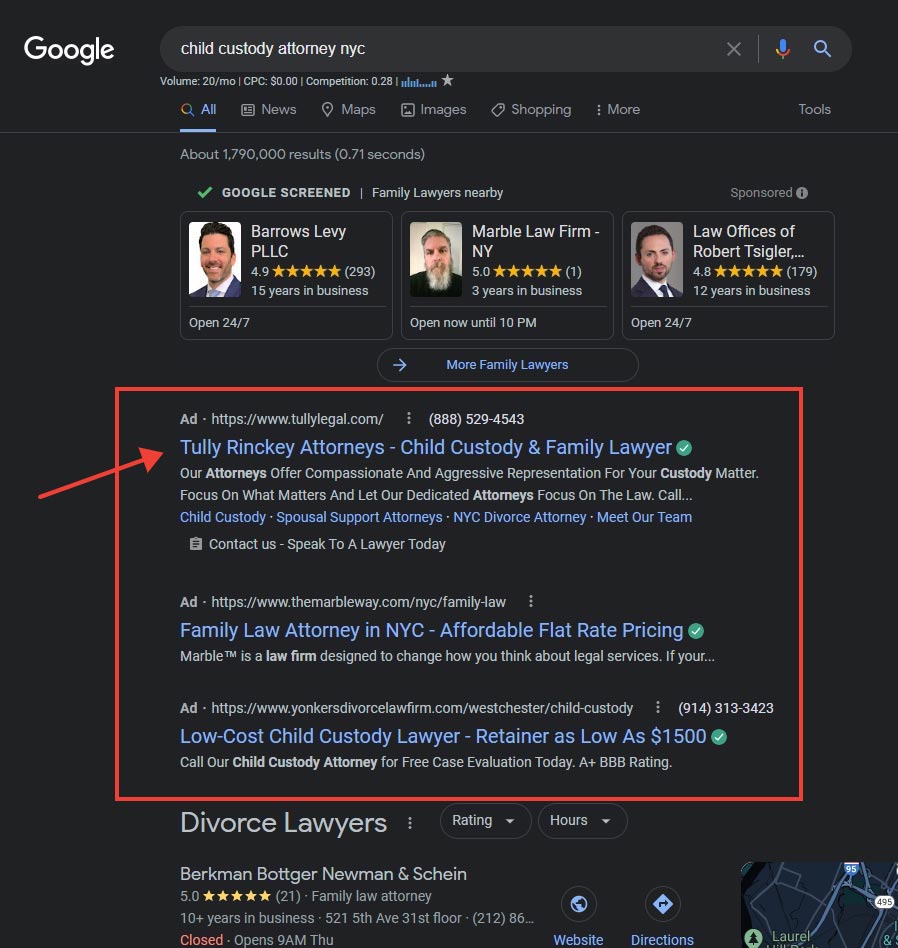
Pay-per-click advertising on Google search
Pay-per-click or PPC advertising is probably the most well-known digital advertising model.
With PPC advertising, you only pay the advertising fee to the publisher of the advert when a user clicks on your ad.
The PPC model is used by many publishers, across the spectrum of digital platforms – search engines, display ads on websites, social media, apps, etc.
With this model, the deliverable for the publisher of the ad is that your advertisement is clicked on by a user.
The fee for this advertising model is usually established by an automated auction system where advertisers bid on specific keywords or phrases to trigger the display of their ads. The auction system also determines other key features of the ad, like the prominence of its display and duration.
Pay-per-lead (PPL) Advertising
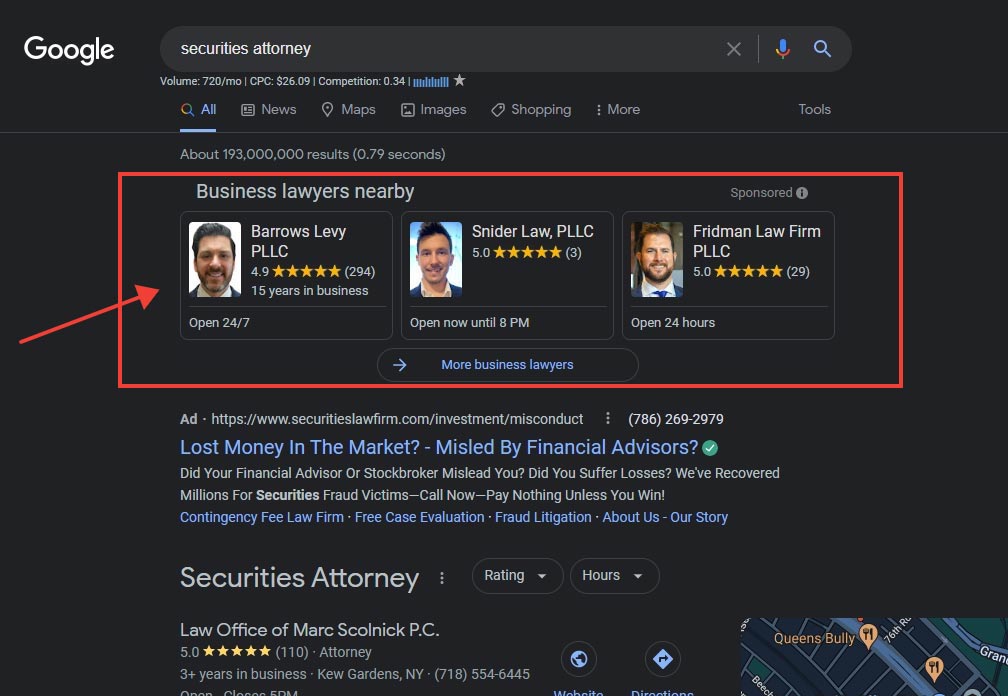
Pay-per-lead lawyer advertising on Google search
Pay-per-lead or PPL advertising is another model that’s used by some publishers on a variety of platforms.
The deliverable for a pay-per-lead ad is for the user to contact the advertiser, usually via trackable calls or email messages, indicating interest to engage their services.
That initiation of communication with the advertiser – by the platform’s user – is the key difference between pay-per-lead and pay-per-click advertising.
Pay-per-lead advertising in this sense should not be confused with the use of client referral services that you pay for. Any kind of situation where you are paying for a fully qualified client or referral by any means is not allowed under the rules of attorney advertising and client solicitation for almost all jurisdictions in the US.
The distinction between PPL advertising and illegal client referral services is that with PPL you place a legitimate advert, and only pay the publisher of that advert when an autonomous user decides to contact you based on your advertising.
With paid referral programs, you typically do not place any ads for your law firm. You get referred clients by the service when you register with them. You then have to pay for those referrals.
With PPL, you’re paying for advertising that leads to a possible client contacting you, with no promise of a closed transaction. With referral services, you’re paying a finder’s fee.
The American Bar Association and almost all local bar associations across the US consider paying for a referral an ethical violation. It can expose you to disciplinary actions.
An example of pay-per-lead advertising is Google Local Services Ads.
On average, PPL advertising tends to be the most expensive model. However, the return on investment is usually higher.
It is often the best ad model for immediate client acquisition for a law firm.
Pay-per-impression (PPI) Advertising
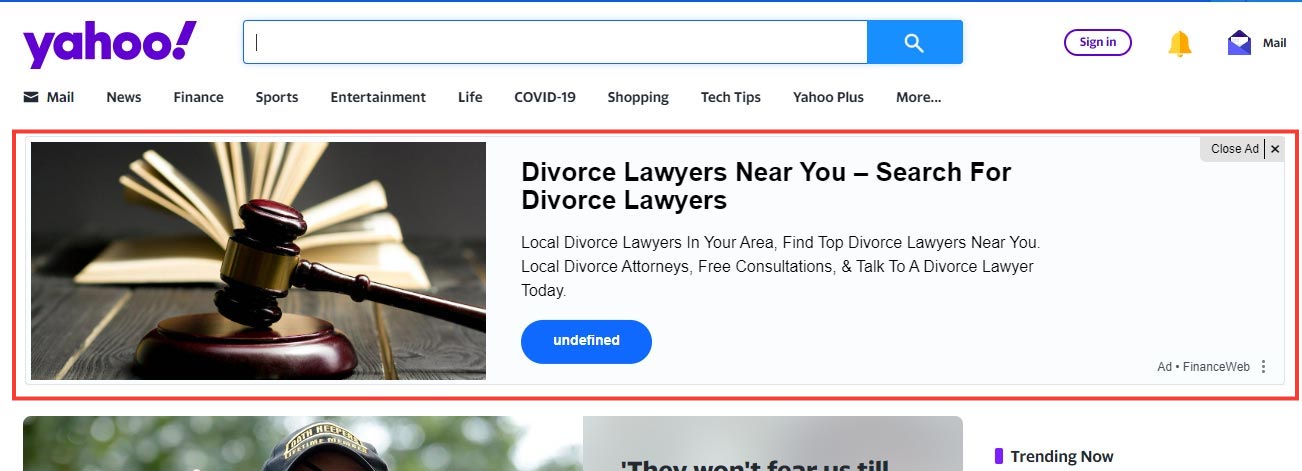
Pay-per-impression advertising on Yahoo homepage
Pay-per-impression or PPI advertising, also known as Cost-per-impression (CPI) or Cost-per-mille (CPM) is another digital advertising model that’s more prevalent with display advertisements on popular websites and apps.
With this model, you pay for the number of people who see your ad – usually measured in thousands.
It’s a carryover from traditional media, where a publisher guarantees an audience of a certain size and you pay for those eyeballs.
The deliverable for a PPI ad is simply for it to be displayed to a user when they visit a webpage, app, or any other digital interface where it’s presented. No further action is guaranteed.
PPI ads are typically cheaper than most other models and are usually best for building brand awareness. It’s also a good model for retargeting or remarketing to past visitors, which we’ll discuss later.
What Are the Different Types of Platforms for Digital Advertising?
As mentioned earlier, there’s a plethora of digital platforms where advertising proliferates.
It’s almost impossible not to encounter advertising in one form or the other while browsing the internet. Virtually every publisher of content that garners some eyeballs is trying to monetize that content with digital advertising.
The platforms break down into a few main categories: search engines, popular websites, business directories, video services, podcasts, mobile apps, games, and social media.
The most important rule for choosing platforms: advertise where your target clients actually spend time.
Despite how popular any platform is, your ideal clients might not use it enough to justify spending money there.
We’ll focus on the platforms that matter most for lawyers: search engines, social media, video services, and business directories.
Advertising Your Law Practice on Search Engines (Search Engine Marketing)
If you’ve ever heard the term “Search engine marketing” or SEM, it’s simply a fancy way to describe the act of advertising on search engines.
It involves buying ad placements on search engine results pages (SERPs), that show up when users search for specific keywords or phrases you’ve bid on in a PPC or PPL ad campaign.
SEM is distinct from search engine optimization (SEO) which is a combination of strategies that you use to get the highest placements on search engine results pages without having to pay the publisher, which in this instance would be the search engine.
Every major search engine, like Google and Bing, has its own advertising business.
Advertising on search engines is generally the most targeted and effective strategy for client acquisition for lawyers. This is because search is intent-driven. Search users are looking for something specific that’s related to your advertisement, if you’ve correctly selected the right keywords to bid on.
This means they’re more likely to engage with your ad, as opposed to a situation where it’s presented to them out of context, and possibly in an intrusive or disruptive manner.
Google Ads: The Foundation of Most Legal Advertising
Google dominates search, which means Google Ads dominates legal advertising.
There are several types of Google ad campaigns you can run:
Google Search Ads
These are the text ads that appear at the top of Google search results when someone searches for keywords you’re bidding on.
For most law firms, this should be your starting point. It’s the most direct connection between “someone needs a lawyer right now” and your practice.
How it works:
- You bid on keywords like “personal injury lawyer Chicago” or “estate planning attorney near me”
- When someone searches those terms, your ad can appear
- You pay when they click on your ad
- They land on your website or a specific landing page
What you need to succeed:
- The right keywords (more on this later)
- Competitive bids (but not stupid ones — don’t just throw money at Google because they suggest higher bids)
- Well-written ad copy
- A landing page that actually converts visitors
Current costs (2026):
Personal injury: $150-400 per click in competitive markets
Family law: $75-200 per click
Estate planning: $30-100 per click
Employment law: $50-150 per click
Criminal defense: $75-250 per click
These are ranges. Your actual costs will vary based on your specific market, competition, and how well you optimize your campaigns.
Google Local Services Ads (LSAs)
Local Services Ads appear at the very top of search results, above even regular search ads.
They’re pay-per-lead, not pay-per-click. You only pay when someone contacts you directly through the ad — either by calling or messaging.
How it works:
- You apply to become “Google Screened” (background check, license verification)
- You set your budget and service areas
- Google shows your ad to people searching for legal services in your area
- You pay when someone contacts you through the ad (not when they just click)
Pros:
- Premium placement above all other ads
- Only pay for actual leads
- Google Screened badge builds trust
- Generally lower cost per lead than search ads
Cons:
- Not available for all practice areas (check if yours qualifies)
- Less control over targeting
- You might get leads outside your ideal client profile
- Some leads are low-quality (people just calling to ask questions)
Current costs (2026):
$50-200 per lead depending on practice area and market. You’ll pay more for personal injury, less for estate planning.
Performance Max Campaigns
Performance Max is Google’s newest campaign type. It uses AI to automatically show your ads across all of Google’s properties — search, display, YouTube, Gmail, Maps.
You give Google your assets (headlines, descriptions, images, videos), your goals, and your budget. Google’s AI decides where and when to show your ads.
Pros:
- Can reach people across multiple Google properties
- AI optimization can find opportunities you’d miss
- Less work to manage once set up
Cons:
- Less control over where your ads appear
- Harder to see exactly what’s working
- Can waste budget on low-quality placements if not set up correctly
- Not ideal if you only want search ads
When to use it: Once you’ve mastered regular search ads and want to expand your reach. Not a good starting point for beginners.
Google Display Network
Display ads are the banner ads you see on websites across the internet.
Google has partnerships with millions of websites that show these ads. You can target by demographics, interests, and websites.
When to use display ads:
- Brand awareness campaigns
- Retargeting people who visited your website
- Building familiarity in your market
When NOT to use display ads:
- As your primary lead generation strategy
- When you have a small budget (search ads will perform better)
- If you’re looking for immediate ROI
Microsoft Advertising (Bing Ads)
Microsoft Advertising (formerly Bing Ads) works similarly to Google Ads but reaches people using Bing, Yahoo, and other Microsoft search partners.
Why bother with Bing?
- About 10-15% of search market share
- Often cheaper cost-per-click than Google
- Less competition
- Bing users tend to be older, higher income (good for some practice areas)
If you’re running Google Search Ads successfully, it’s usually worth also running Microsoft Ads. You can often import your Google campaigns directly.
How to Successfully Advertise Your Law Firm on Search Engines
Success with search advertising comes down to a few key factors:
1. Bid on the right keywords
Not just high-volume keywords. The right keywords for your practice.
Use tools like:
Look for keywords with:
- Clear intent to hire a lawyer
- Relevance to your specific practice
- Search volume that makes sense for your market
- Cost-per-click you can afford
2. Use negative keywords religiously
Negative keywords prevent your ads from showing for irrelevant searches.
For example, if you’re a criminal defense attorney, you might add negative keywords like:
- “jobs” (filters out “criminal defense attorney jobs”)
- “salary” (filters out “criminal defense attorney salary”)
- “become” (filters out “how to become a criminal defense attorney”)
- “movie” (filters out searches about legal TV shows)
This saves you money by preventing wasted clicks from people who aren’t looking for a lawyer.
3. Write compelling ad copy
Your ad needs to:
- Include your primary keyword in the headline
- Highlight what makes you different
- Include a clear call to action
- Match what’s on your landing page
Google uses “Responsive Search Ads” now, where you provide multiple headlines and descriptions and Google tests combinations. Provide at least 10-15 headline options and 4-5 description options.
4. Optimize for Quality Score
Google assigns every keyword a Quality Score from 1-10 based on:
- Expected click-through rate
- Ad relevance
- Landing page experience
Higher Quality Scores mean:
- Lower cost per click
- Better ad positions
You improve Quality Score by:
- Creating relevant ad copy that matches your keywords
- Sending people to landing pages that match your ad
- Getting good click-through rates
5. Have competitive (but not insane) budgets
Google will always suggest you increase your bids. Ignore most of this advice.
The goal isn’t to have the top ad position. The goal is to get clients profitably.
Sometimes position 2 or 3 has a better return on investment than position 1 because you’re paying less per click.
The goal should always be to spend only as much as you need to, and no more. Anything beyond that simply drives up the price for all advertisers in that market and diminishes the ROI on your ad spend.
6. Track everything
You need to know:
- Which keywords are generating leads
- What those leads cost
- Which leads actually become clients
- What those clients are worth
Without this data, you’re just guessing.
Advertising Your Law Firm on Popular Websites
Almost any website will take your money to show ads.
These range from popular blogs to massive web portals with huge audiences.
The ad models are usually PPC or PPI display ads — banner ads placed on web pages.
The problem:
Just because a website has traffic doesn’t mean it’s a good fit for your law firm.
What matters:
Does the website’s audience match your ideal client profile?
Niche sites targeting specific audiences often provide the best opportunities. For example:
- Estate planning firm advertising on retirement planning sites
- Family law firm advertising on parenting blogs
- Employment lawyer advertising on HR professional sites
Before advertising on any website:
- Research their traffic (use SimilarWeb or ask for their media kit)
- Verify their audience demographics
- Start with a small test budget
- Track results carefully
Most lawyers will get better results focusing budget on search ads rather than website display ads.
Advertising Your Law Firm on Business and Legal Directories
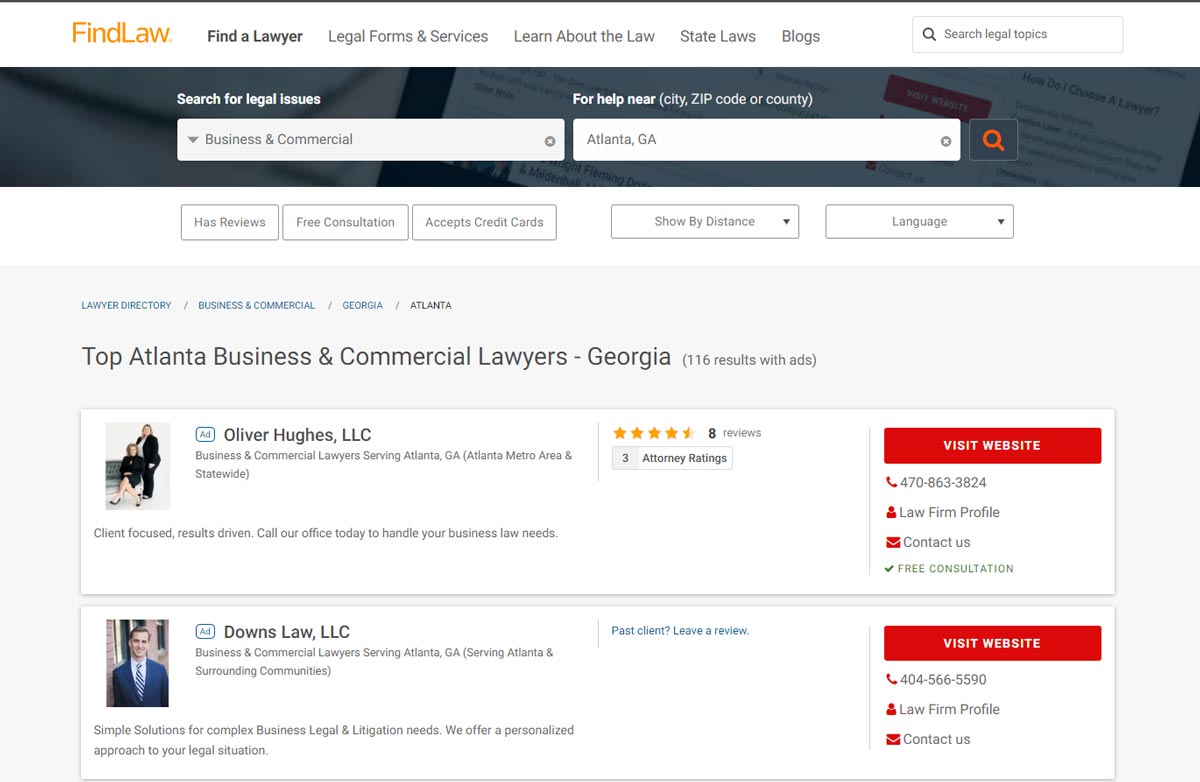
Lawyer ads on a legal business directory
Just like websites, there are many business directories that sell advertising.
Google business profiles, is probably the most well-known example of such a service. Legal directories like Avvo, FindLaw, Justia, Lawyers.com, and Martindale-Hubbell also all sell advertising.
The reality:
Most people using legal directories are either:
- Other lawyers looking for referral sources
- People doing very early research (not ready to hire yet)
When directory advertising makes sense:
- You get a lot of referral business from other lawyers
- You practice in a niche where people do extensive research
- You have budget left after maxing out search ads
When it doesn’t:
- As your primary advertising strategy
- When you have a limited budget (search ads will perform better)
These directories sometimes do well in search results for some query types, so premium ads on them will help you get more visibility among other lawyers, if a search user is directed to them.
At minimum, maintain free basic profiles on major legal directories. But spending heavily on directory advertising usually doesn’t produce the return that search advertising does.
Advertising Your Law Firm on Social Media

Advertising on social media
Social media platforms are enormously popular. Whether it’s Facebook, Instagram, LinkedIn, TikTok, or Twitter/X, people spend hours every day on these platforms.
And so do some of your potential clients.
As always, the main question is: Does your target audience use this platform in large enough numbers to justify advertising there?
A platform might be very popular overall, but if your ideal clients aren’t there, it’s a waste of money.
Meta Ads (Facebook & Instagram)
Facebook and Instagram (both owned by Meta) use the same advertising platform. You can run ads on either or both.
Best for:
- Consumer-facing practice areas (personal injury, family law, criminal defense, immigration)
- Building brand awareness
- Retargeting website visitors
- Reaching people age 25-65
Not great for:
- Complex B2B legal services
- Practices targeting primarily business owners or executives
- Immediate lead generation (people on social media aren’t actively searching for lawyers)
How it works:
You create ads that appear in users’ feeds or stories. You can target by:
- Location
- Age
- Gender
- Interests
- Behaviors
- Job titles (limited since iOS privacy changes)
Current reality in 2026:
Apple’s iOS privacy changes have made Facebook targeting less precise than it used to be. You can’t microtarget as effectively as you could a few years ago.
This means:
- Your ads will reach more people outside your ideal audience
- You’ll waste more budget on unqualified traffic
- Facebook’s AI targeting (Advantage+ campaigns) works better than manual targeting in many cases
Meta ad costs (2026):
$0.50-$5 per click for legal services
$10-50 per lead (depending on how you’re tracking leads)
Best practices:
- Use video when possible (gets better engagement)
- Lead forms work better than sending people to your website
- Run retargeting campaigns to people who visited your site
- Test multiple ad variations
- Be patient — social ads take longer to generate clients than search ads
LinkedIn Ads
LinkedIn is the professional social network. If you’re targeting business professionals or B2B clients, this is your platform.
Best for:
- Employment law
- Business litigation
- Corporate law
- Any practice area serving businesses or executives
Not good for:
- Consumer-facing practices
- Small budgets (LinkedIn is expensive)
How it works:
You can target by:
- Job titles
- Company size
- Industry
- Seniority level
- Skills
- Groups
This professional targeting is LinkedIn’s strength. You can reach exactly “HR Directors at companies with 500+ employees in Chicago” if that’s your ideal client.
LinkedIn ad costs (2026):
$5-15 per click (yes, much higher than Facebook)
$50-200 per lead
LinkedIn is expensive. But if your average client value is high and you’re targeting the right audience, it can work.
Best practices:
- Use Sponsored Content (ads in the feed) rather than text ads
- Lead Gen Forms (forms that fill automatically with LinkedIn profile data) convert better
- Target narrowly — don’t waste money on broad audiences
- Focus on thought leadership content, not hard sales pitches
TikTok Ads
TikTok is the fastest-growing social platform, especially for younger users.
Best for:
- Criminal defense
- Immigration law
- DUIs and traffic violations
- Tenant rights / landlord disputes
- Any practice serving clients under 35
Not good for:
- Estate planning
- Corporate law
- Most B2B practices
- Firms uncomfortable with informal, personality-driven content
How it works:
TikTok ads appear in users’ “For You” feed. They need to feel native to the platform — meaning informal, authentic, personality-driven content works best.
You can’t just repurpose your Facebook ads and expect them to work here.
Current costs (2026):
$1-3 per click
Minimum daily budget of $50 (so not for tiny budgets)
Reality check:
TikTok ads work best when combined with organic TikTok content. Running ads without also creating regular TikTok content usually doesn’t work well.
If you’re not willing to actually be on TikTok creating content, skip advertising there.
Twitter/X Ads
Twitter can work for lawyers trying to build media relationships or establish thought leadership, but it’s generally not great for direct client acquisition.
The platform has been unstable since recent changes in ownership. Advertising options and costs change frequently.
Unless you have a specific reason to advertise on Twitter/X, your money is probably better spent elsewhere.
Advertising on YouTube
YouTube is the second-largest search engine in the world. Billions of people search for and watch videos every day.
Types of YouTube ads:
1. In-Stream Ads — Play before, during, or after other videos. Can be skippable or non-skippable.
2. Video Discovery Ads — Appear in search results and recommended videos.
3. Bumper Ads — 6-second non-skippable ads.
Best for:
- Building brand awareness
- Reaching people researching legal topics
- Demonstrating your personality and expertise
How to succeed with YouTube ads:
- Target specific channels or videos relevant to your practice
- Create ads that provide value, not just sales pitches
- Use the first 5 seconds to hook attention (most people skip)
- Include clear calls to action
Current costs (2026):
$0.10-$0.30 per view (a “view” is someone watching at least 30 seconds)
Much cheaper than search ads, but also less direct intent
Alternative approach:
Instead of running YouTube ads, sponsor popular YouTubers whose audience matches your ideal clients. Directly sponsor their content. This often works better than the automated YouTube ad system.
Advertising on Podcasts
Podcast advertising has grown significantly. Millions of people listen to podcasts regularly.
Two approaches:
1. Podcast advertising platforms
Services like Megaphone, Spotify Ads, and Audacy let you buy ads across multiple podcasts.
2. Direct podcast sponsorships
Find popular podcasts with an audience that matches your ideal clients and sponsor them directly.
Direct sponsorships usually work better because:
- The host reads your ad (more authentic)
- You’re associated with a show your ideal clients already trust
- Better targeting than broad podcast networks
What it costs:
$15-50 CPM (cost per thousand listeners) for direct sponsorships
Varies widely for podcast networks
Best for:
- Brand awareness
- Reaching niche audiences
- Practices with specific ideal client profiles
AI & Automation in Legal Advertising
AI has changed digital advertising significantly in the past few years. If you’re not using AI tools, you’re at a disadvantage.
How AI Improves Your Advertising
1. Smart Bidding
Google, Meta, and other platforms now use AI to optimize your bids in real-time.
Instead of you manually setting bids for each keyword, AI adjusts bids based on:
- Likelihood someone will convert
- Time of day
- Device
- Location
- Hundreds of other signals
Google’s Smart Bidding strategies:
- Target CPA (Cost Per Acquisition) — AI bids to hit your target cost per lead
- Maximize Conversions — AI gets you the most conversions within your budget
- Target ROAS (Return on Ad Spend) — AI optimizes for revenue
Reality: These work, but only if you have enough conversion data. If you’re just starting out with less than 30 conversions per month, manual bidding often works better.
2. AI-Generated Ad Copy
Tools like ChatGPT, Claude, and specialized ad tools can help you write ad copy faster.
How to use AI for ad copy:
- Generate 20-30 headline variations, then pick the best 10-15
- Create multiple description variations
- Get ideas for different angles to test
- Rewrite weak-performing ads
What AI can’t do:
- Know your specific clients’ pain points (you have to tell it)
- Understand local market nuances
- Replace testing (AI might suggest copy that sounds good but doesn’t convert)
Use AI to speed up creation, but always test performance.
3. Automated Ad Creative Testing
Platforms now automatically test different combinations of your headlines, descriptions, and images.
Google’s Responsive Search Ads test up to 15 headlines and 4 descriptions in different combinations.
Meta’s Dynamic Creative tests different images, headlines, and calls to action.
Best practice: Provide lots of variations and let the AI find what works. Don’t try to guess — let the data decide.
4. Predictive Analytics
Some platforms now use AI to predict:
- Which leads are most likely to convert
- When to show your ads for best performance
- Which audience segments will respond best
This happens automatically in the background of most modern ad platforms.
AI Tools for Legal Advertising
For keyword research:
- ChatGPT or Claude (ask it to generate keyword ideas for your practice)
- SEMrush (uses AI to suggest keywords)
- Ahrefs (similar)
For ad copy:
- ChatGPT
- Claude
- Jasper AI
- Copy.ai
For ad creative:
- Canva (has AI design tools)
- Adobe Firefly (AI image generation)
- Midjourney (for background images)
For optimization:
- Google’s built-in Smart Bidding
- Meta’s Advantage+ campaigns
- Optmyzr (for managing and optimizing campaigns)
When to Use AI vs. Manual Control
Use AI when:
- You have enough data (30+ conversions per month)
- You’re running campaigns across multiple platforms
- You need to test many variations quickly
- You want to save time on routine optimization
Use manual control when:
- You’re just starting (not enough data for AI to learn from)
- You have very specific targeting requirements
- Your budget is small (AI needs budget to test)
- You’re in a very unusual niche
Most successful campaigns use a combination — AI for optimization and testing, human judgment for strategy and creative direction.
Privacy, Tracking, and the Cookie-Less Future
The way digital advertising works has changed significantly due to privacy regulations and technology changes.
What Changed
1. Third-Party Cookies Are Dying
Third-party cookies used to track people across websites. They’re mostly gone now.
Google announced they’re phasing them out completely. Firefox and Safari already block them.
This means:
- Harder to track people after they leave your website
- Retargeting is less precise
- Attribution is messier
2. iOS Privacy Changes
Apple’s iOS privacy updates let users block tracking from apps like Facebook.
About 60-70% of iOS users opted out of tracking.
Result: Facebook/Meta can’t track what these users do outside Facebook. This means:
- Less precise targeting
- Harder to measure results
- Higher costs per conversion
3. Privacy Regulations (GDPR, CCPA)
Privacy laws in Europe (GDPR) and California (CCPA) require user consent for tracking.
Other states are following California’s lead.
This means:
- You need cookie consent banners on your website
- Some users will opt out of tracking
- You’ll lose some tracking data
What This Means for Your Advertising
Good news:
- Search ads still work great (people are actively searching, no tracking needed)
- First-party data (data you collect directly) is more valuable
- Platforms are adapting with new solutions
Bad news:
- Retargeting is less effective
- Some tracking data is lost
- Attribution is harder
How to Adapt
1. Focus on First-Party Data
First-party data is information you collect directly from people who interact with your business.
Examples:
- Email addresses from newsletter signups
- Contact information from consultations
- Phone numbers from calls
- Website visitor behavior (tracked with your own tools)
How to use it:
- Upload email lists to Facebook/Google for Customer Match targeting
- Use your CRM data to find patterns in good clients
- Create lookalike audiences based on your actual clients
2. Use Server-Side Tracking
Server-side tracking sends data directly from your server to ad platforms, bypassing browser privacy restrictions.
It’s more technical to set up but gives you better data.
Tools: Google Tag Manager Server-Side, Segment, Zapier
3. Accept That Attribution Will Be Imperfect
You won’t be able to track everything perfectly anymore.
That’s okay. Focus on:
- Overall trends (are leads increasing?)
- Cost per lead across platforms
- Revenue trends
Don’t obsess over attributing every single conversion to a specific ad. That level of precision is gone.
4. Ask People How They Found You
Low-tech solution: Just ask new clients how they heard about you.
Add a field to your intake form: “How did you find us?”
Combine this self-reported data with your digital tracking for a fuller picture.
Setting Up Proper Tracking and Attribution
Most lawyers skip this step or do it poorly. That’s a huge mistake.
Without proper tracking, you have no idea what’s working. You’re just guessing and hoping.
What You Need to Track
Minimum tracking setup:
1. Call Tracking
If people call you (and they will), you need call tracking.
Use a service like:
- CallRail
- CallTrackingMetrics
- DialogTech
These give you unique phone numbers for each advertising source. When someone calls, you know which ad they came from.
Cost: $30-100/month
2. Google Analytics 4
Free tool from Google that tracks website visitors.
Shows you:
- How many people visit your site
- Where they came from
- What pages they looked at
- How long they stayed
Set it up: analytics.google.com
3. Conversion Tracking in Your Ad Platforms
Each platform (Google Ads, Facebook, LinkedIn) needs to know when someone converts on your website.
“Conversion” could be:
- Filling out a contact form
- Calling you
- Chatting with you
- Downloading something
Set up conversion tracking in each platform you advertise on.
4. CRM or Lead Tracking System
You need a system to track:
- Which leads came from which source
- Which leads became clients
- What those clients are worth
Can be as simple as a spreadsheet or as complex as a CRM like Clio, Lawmatics, or HubSpot.
How to Measure ROI
The formula is simple:
ROI = (Revenue from Ads – Cost of Ads) / Cost of Ads
Example:
- You spent $5,000 on Google Ads last month
- Those ads generated 20 leads
- 4 leads became clients
- Those 4 clients brought in $30,000 in revenue
ROI = ($30,000 – $5,000) / $5,000 = 5 or 500%
For every $1 you spent, you made $5 back.
To calculate this, you need to know:
- How much you spent on ads (easy)
- How many leads came from ads (need tracking)
- How many leads became clients (need CRM or tracking system)
- How much revenue those clients generated (your billing system)
Reality check: Most lawyers don’t close this loop. They know how much they spend and how many leads they get, but don’t track which leads actually became clients.
Close this loop and you’ll be ahead of 80% of your competitors.
Key Metrics to Watch
For Search Ads:
- Cost per click (CPC)
- Click-through rate (CTR)
- Conversion rate
- Cost per lead
- Cost per client
- Revenue per client
For Display/Social Ads:
- Impressions
- Click-through rate
- Cost per click
- Cost per lead
- Cost per client
Red flags:
- Cost per click increasing month over month
- Conversion rate dropping
- Cost per lead higher than client value
- Lots of clicks but no conversions (landing page problem)
Review these weekly. Adjust based on what the data shows.
Defining Your Digital Advertising Goals
Before you spend a dollar on advertising, define what you want to accomplish.
Establishing clear objectives for your advertising will dictate your strategy and the platforms that you choose to advertise on.
The two most common advertising goals for law firms are lead generation and creating brand awareness.
With the former, the objective is immediate client acquisition, and with the latter, the objective is driving traffic to your website to create brand awareness.
If immediate client acquisition is the goal, it’s best to focus your ad spend on pay-per-lead and search-based marketing campaigns.
For building brand awareness, pay-per-impression display advertising is a better and more economical option.
A solid digital advertising campaign should ideally address both goals, even though it might be weighted more heavily on one side. In such a scenario, allocate the majority of your ad budget to the primarily goal, and the remainder to the secondary goal.
Example:
1. Lead Generation
Get consultation requests from qualified potential clients.
Best platforms: Google Search Ads, Google Local Services Ads
2. Brand Awareness
Get your firm’s name in front of your target market so they think of you when they need a lawyer.
Best platforms: Google Display Network, Facebook, YouTube
3. Both (The Smart Approach)
Allocate most budget to lead generation, some to brand awareness.
Example split:
- 70% search ads (leads)
- 20% Local Services Ads (leads)
- 10% display or social (awareness)
Set SMART Goals:
Specific, Measurable, Achievable, Relevant, Time-bound
Bad goal: “Get more clients”
Good goal: “Generate 20 qualified personal injury leads per month at under $200 per lead through Google
Search Ads within 90 days”
Working With Advertising Networks
For the most part, the discussion so far has been based on a scenario where you are contracting with publishers directly and paying for advertising on individual platforms.
Often what happens is that you’ll be using an advertising network, and they’ll promote your advertisements on their network of properties online, along with those of their partners.
A prime example of this is if you’re using a service like Google Ads. Google Ads are propagated on their search engine and some of their other properties like YouTube, partner websites and partner ad networks. Microsoft Ads and Audience network is similar.
With networks like these, besides the search engine that may be the primary property you wish to advertise on, your ads may also be displayed on other properties they own or partner with. Those other properties will typically be the types we’ve already covered like partner websites, video services, apps, etc.
You often will be able to decide if you’d like to allocate all your advertising budget to be spent advertising on the search engine results pages, or to have it split with display advertising on partner networks.
If you opt to display advertising on partner networks in addition to search, you will have your ads showing up on partner websites, video services, and other properties that the ad network may own.
This may not always be what you want or need. Your advertising goals – lead generation or brand awareness – should dictate how you allocate your budget when using advertising networks.
It’s therefore very important to understand where and under what circumstances your ads will be showing up, how that aligns with your advertising goals, and how that may impact your overall budget when you use advertising networks for your campaigns.
As much as possible, you want to avoid any wasted advertising. This can occur very easily if your ads automatically get thrown on-to properties with the wrong audience. In such a scenario, if the ads are presented intrusively, those users may click on them just to get them out of their way, without having any interest in what you’re offering. This will deplete your ad budget and will work against you, while working to the advantage of the publisher.
How Ad Networks Work
Example: Google Ads
When you run Google Ads, your ads can appear on:
- Google Search
- Google Maps
- YouTube
- Gmail
- Millions of partner websites (Google Display Network)
You don’t contract with each property individually. Google handles everything.
Similar networks:
- Microsoft Advertising (Bing, Yahoo, partner sites)
- Meta Ads (Facebook, Instagram, Messenger)
- LinkedIn Ads
- Amazon Ads
Network vs. Direct Placement
Advantages of networks:
- Massive reach
- Automated optimization
- Easier management (one platform)
- Better targeting tools
Disadvantages:
- Less control over exactly where ads appear
- Can waste money on irrelevant placements
- Some fraud risk on partner sites
How to Optimize Network Campaigns
1. Review Placement Reports
See exactly where your ads are showing.
Google Ads → Campaigns → Placements
If specific websites or apps are wasting your money, exclude them.
2. Separate Search from Display
Don’t lump search ads and display ads in the same campaign.
They need different strategies, budgets, and optimization.
3. Use Placement Exclusions
Block categories or specific sites that don’t make sense for legal advertising:
- Games
- Gambling sites
- Adult content
- Low-quality content farms
4. Monitor Quality of Traffic
High clicks but no conversions from certain placements? Exclude them.
5. Set Bid Adjustments
Bid more for placements that work, less for those that don’t.
How to Create Effective Ads
We’ve covered a lot of topics so far, but your advert itself is a critical part of the equation.
While the exact format – the size and dimensions for the ad, permitted character or word lengths, color formats, etc. – will vary based on the particular requirements for each platform, the content overall has to be properly crafted to resonate with your target audience.
Your ad copy, headlines and overall message must be clear, direct, and succinct. If you’re using images and graphics to help sell your message, they must be relevant to what you’re trying to convey.
All the texts in your ad must be legible. This is particularly important if you’re using graphics with text or making video ads that have text displayed. Make sure that there is sufficient contrast between the image or video backgrounds you use, and the texts overlaid on them.
Many internet users already have trained themselves to ignore ads on the internet – a well-known phenomenon known as “Ad Blindness”. The harder you make your ads to read, the easier they are to ignore.
Finally, you must use clear calls to action that will motivate viewers of your ad to act.
Writing Ad Copy That Actually Works
Your ads compete with dozens of other law firms. You need copy that stands out and gets clicks.
The Formula for Legal Ad Copy
Headline:
- Include your primary keyword
- Mention your location
- State your unique value proposition
Examples:
- “Chicago Car Accident Lawyer – Free Consultation”
- “Divorce Attorney NYC – 20+ Years Experience”
- “DUI Defense – Former Prosecutor – Free Case Review”
Description:
- Highlight key benefits (free consultation, no fees unless you win, etc.)
- Include credentials or differentiation
- Clear call to action
Example:
“Injured in a car accident? Our Chicago personal injury lawyers have recovered $50M+ for clients. Free consultation. No fees unless you win. Call now.”
What Works in 2026
1. Be Specific
“Personal injury lawyer” → “Car accident lawyer serving Chicago”
“Family law attorney” → “Divorce attorney specializing in high-net-worth cases”
Specific converts better than generic.
2. Lead With Benefits, Not Features
Bad: “20 years of experience”
Good: “We’ve won 500+ cases like yours”
Bad: “Board certified”
Good: “Get the results you deserve”
People care about what you can do for them, not your credentials.
3. Use Numbers When Possible
- “Recovered $50M+ for injury victims”
- “500+ cases won”
- “Rated 5.0 stars by 200+ clients”
Numbers add credibility and catch attention.
4. Create Urgency (Ethically)
- “Free consultation – Limited slots available”
- “Don’t wait – statute of limitations applies”
- “Call today for immediate help”
5. Match Search Intent
If someone searches “how much does a divorce cost,” your ad should speak to that:
“Divorce Attorney – Transparent Pricing
Affordable divorce representation. Free consultation to discuss costs.”
Don’t just show your generic “divorce lawyer” ad.
Responsive Search Ads Best Practices
Google uses Responsive Search Ads where you provide multiple headlines and descriptions.
Provide 10-15 headlines including:
- 3-4 with your primary keyword
- 2-3 with location
- 2-3 with benefits
- 2-3 with differentiators
- 2-3 calls to action
Provide 4 descriptions:
- One focused on credentials
- One focused on benefits
- One focused on process (how easy you make it)
- One with strong call to action
Google will test combinations and show what performs best.
Ad Copy Formulas That Work
For Personal Injury:
“[Location] [Case Type] Lawyer – No Fees Unless You Win
We’ve recovered $[amount] for injury victims. Free consultation. Call now.”
For Family Law:
“[Location] Divorce Attorney – Protect Your Future
Experienced, compassionate representation. Free consultation.”
For Criminal Defense:
“[Location] [Charge] Defense – Former [Prosecutor/Public Defender]
Aggressive defense of your rights. Free case review.”
For Estate Planning:
“Affordable Estate Planning – [Location]
Protect your family’s future. Flat-fee pricing. Free consultation.”
Testing Ad Copy
Always run at least 3-5 ad variations.
Test different:
- Headlines
- Benefit statements
- Calls to action
- Emotional vs. logical appeals
Let them run for at least 100 clicks or 2 weeks, then cut the losers and create new variations.
The Importance of Having a High-Converting Landing Page or Website
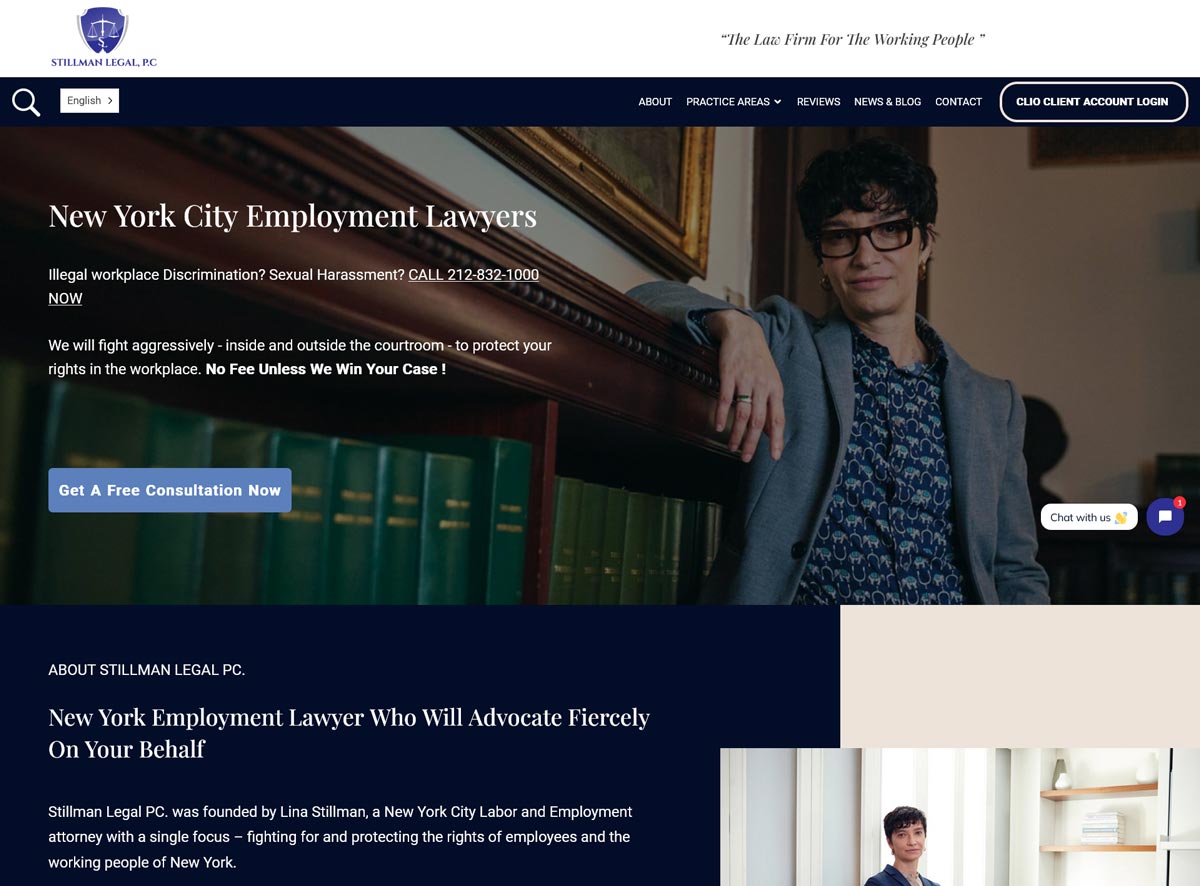
A professional, high-converting law firm website
If you’re running PPC search ads on networks like Google Ads and Microsoft Ads that drive visitors to a specific landing page or website, you must ensure that when they get there, they will find content that’s relevant to your advertising and that will get them to act – or in marketing terms, convert.
These networks use an automated auction system for PPC ads that factor in the quality of your landing page or website – among other things – to determine what it’ll cost you for every click on your ad, as well as the prominence your ads will get on the properties they’re displayed on.
As with most things to do with search engines, the exact details of the algorithms are secret, but the performance of your landing page is one of the components that is measured to establish what’s known as the Quality Score of your ad, and it is very impactful.
It’s not enough to simply throw the most money into your bids to have successful SEM campaigns. You could place the highest bids for your keywords and still lose out.
You need to always keep in mind that even though you’re paying for advertising on search engines, the search engines still want to take their users to legitimate destinations that are likely to give them the kinds of content they expect to find. That’s why you must make sure that everything from your ads to your landing page or website is properly optimized and relevant. Learn how to get a successful website for your law practice.
Besides the impact on your Quality Score, it’s a wasted exercise to throw money on advertising if the traffic you generate is funneled to a landing page that will make visitors question your credibility, or that’s confusing or unprofessional, or totally unrelated to the offer in your advertising.
What Makes a High-Converting Landing Page
1. Message Match
Your landing page must match what your ad promised.
If your ad says “Free Consultation for Car Accident Cases,” your landing page headline should say exactly that.
Don’t send people to your generic homepage. Send them to a specific page about the service they searched for.
2. Clear, Prominent Headline
The headline should be the first thing people see, and it should match the ad.
Bad: “Welcome to Smith Law Firm”
Good: “Chicago Car Accident Lawyers – Free Consultation”
3. One Clear Call to Action
Tell people exactly what to do:
- “Call Now for Free Consultation: [phone number]”
- “Fill Out This Form for Free Case Review”
- “Schedule Your Free Consultation”
Don’t give people 10 different options. One clear next step.
4. Easy Click-to-Call on Mobile
60-70% of legal searches happen on mobile.
Your phone number must be:
- Clickable (tap to call)
- Large and prominent
- Above the fold (visible without scrolling)
5. Trust Signals
People need to trust you before they’ll contact you.
Include:
- Client testimonials / reviews
- Case results (where ethically permitted)
- Awards or certifications
- Years in practice
- Photos of attorneys (people like seeing who they’re calling)
- Association memberships (ABA, state bar, etc.)
6. Simple, Short Form
If you use a contact form, keep it simple:
- Name
- Phone
- Brief description of their case
Don’t ask for their entire life story. Just enough to call them back.
7. No Navigation Distractions
Remove or minimize your main site navigation.
You want people to either call you or fill out the form, not wander around your site.
8. Fast Load Time
If your page takes more than 3 seconds to load, people leave.
Optimize:
- Compress images
- Use fast hosting
- Minimize code bloat
Test your page speed at PageSpeed Insights.
Landing Page Structure
Here’s a proven structure:
Above the fold (visible without scrolling):
- Headline matching the ad
- Sub-headline with key benefit
- Prominent phone number (click-to-call)
- Primary call to action button
- Hero image or video
Below the fold:
- Brief description of how you help
- 3-5 key benefits or reasons to choose you
- Trust signals (reviews, awards, results)
- Attorney bios with photos
- Contact form
- Second call to action
Footer:
- Required disclaimers
- Privacy policy link
- Additional contact info
Common Landing Page Mistakes
Sending everyone to your homepage: Homepage is for people who already know you. Ad traffic needs a specific page.
Too much text: People skim. Keep it concise.
Buried phone number: Make it impossible to miss.
Generic stock photos: Use real photos of your team.
No mobile optimization: Most traffic is mobile. Test on phone.
Slow loading: Every second costs you conversions.
Asking for too much information: Name, phone, email is enough.
No social proof: Add testimonials and reviews.
How to Establish a Realistic Budget for Your Digital Ad Campaigns
Legal advertising is extremely competitive in most US markets and bids for keywords and advertising rates can be quite high.
Several factors are behind this. One of those is simply the fact that there is a huge number of lawyers providing legal services in the US. Currently that number is about 1.3 million. Additionally, lawyers are constrained in the ways that they can market their services and solicit business. Advertising is one of the few avenues available to most law firms to raise awareness about their services.
As such, the demand for legal advertising is huge and often outstrips supply in some US markets, which only serves to drive up the cost of advertising in those markets. When that is coupled with inefficient advertising campaigns, where some players feel that the only solution is to throw as much money as possible into a campaign, you get a scenario where the cost of advertising continues to increase for every advertiser in that market.
For any advertising campaign to make financial sense, the cost of advertising has to match up with the return on investment in a meaningful ratio.
While specific amounts are going to vary widely based on your overall marketing budget, goals, and the market you’re operating in, a ratio of about 1:2.5 – with every ad spend of a dollar bringing in about two and half dollars in new business – is a realistic budget to start with.
As you plan your overall campaign, you need to monitor that ratio to see that it doesn’t start to dip lower. Regardless of the bid rates that some auction systems will suggest to you, prompting you to optimize your bids continuously by spending more and more, if you start to spend to the point where your ratio is approaching 1:1, you’ll be running a losing campaign with no ROI.
What Drives Ad Costs
1. Competition
More lawyers bidding on the same keywords = higher costs.
Personal injury in major metros: Most expensive
Estate planning in small towns: Least expensive
2. Practice Area
Some practice areas have higher client lifetime values, so lawyers can afford to pay more per lead.
Most expensive practice areas for ads:
- Personal injury
- Medical malpractice
- Mass torts
- Mesothelioma
Least expensive:
- Estate planning
- Traffic tickets
- Small business legal
- Real estate (transactional)
3. Market Size
Big cities = more competition = higher costs
Small towns = less competition = lower costs
4. Quality of Your Campaigns
Better-optimized campaigns pay less per click.
If your Quality Score is low, you’ll pay more. If it’s high, you’ll pay less.
Budget Planning Framework
Here’s how to think about budgets at different firm sizes:
Small Firm Budget: $2,000-5,000/month
Recommended allocation:
- 80% Google Search Ads ($1,600-4,000)
- 20% Google Local Services Ads if available ($400-1,000)
Skip:
- Display ads
- Social media ads (unless very specific targeting)
- Multiple platforms
Focus everything on search. You don’t have enough budget to spread around.
Medium Firm Budget: $5,000-15,000/month
Recommended allocation:
- 60% Google Search Ads ($3,000-9,000)
- 20% Google Local Services Ads ($1,000-3,000)
- 10% Meta/Facebook Ads ($500-1,500)
- 10% Retargeting ($500-1,500)
Now you can test other platforms while keeping most budget on search.
Large Firm Budget: $15,000+/month
Recommended allocation:
- 50% Google Search Ads ($7,500+)
- 20% Google Local Services Ads ($3,000+)
- 15% Meta/Facebook Ads ($2,250+)
- 10% LinkedIn (if B2B focus) or YouTube ($1,500+)
- 5% Retargeting ($750+)
You have enough budget for a comprehensive multi-platform strategy.
The 1:2.5 ROI Target
A good starting target is $1 in ad spend for every $2.50 in revenue.
Example:
- You spend $10,000 on ads
- You should generate at least $25,000 in new client revenue
As you optimize, you might improve this to 1:3 or 1:4 or better.
Red flags:
- Spending more on ads than you’re making from them (1:1 or worse)
- ROI declining month over month
- Leads increasing but clients not (qualification problem)
How to Scale Your Budget
Don’t just throw more money at campaigns.
Scale smart:
1. Master one platform first
Get Google Search Ads working profitably before adding other platforms.
2. Increase budget on what’s working
If certain keywords or campaigns are profitable, invest more there.
3. Test new platforms with 10-20% of budget
Don’t bet the farm on unproven channels.
4. Monitor ROI closely
As you spend more, ROI often decreases (you’ve already captured the easiest wins).
Know when to stop scaling.
Budget Mistakes to Avoid
Setting it and forgetting it: Review and adjust monthly at minimum.
Spreading too thin: Better to dominate one platform than suck at five.
Chasing Google’s suggestions: They want you to spend more. Ignore most “optimize your budget” prompts.
No tracking: Can’t manage what you don’t measure.
Stopping when it works: A profitable campaign is a signal to scale up, not coast.
How to Mitigate Digital Advertising Fraud
In the digital advertising space, there are some fraud schemes that exist.
Most of these schemes typically affect PPC ads, and the most pervasive type is known as Click Fraud.
Given that with PPC advertising you pay the publisher every time a user clicks on your ad from their property, it’s easy to see why some publishers might be incentivized to get click-happy with your ads. With every click, they make more money. Some publishers deliberately practice fraud of this kind to make more money from you.
The same also happens when you contract with Ad networks like Google Ads or Microsoft Ads. These networks partner with millions of independent publishers all around the world who show those network-managed ads on their own websites and online properties and get a share of the ad revenue.
Most of these partner publishers are honest, but not all are scrupulous. Some employ very sophisticated schemes that involve software programs known as Click Bots that automatically click repeatedly on ads to inflate the revenue they receive.
There are some very large operations involving these Click Bots, known as Click Farms, that carry out these activities on a massive scale. There are also human operations, with enormous sweatshops in some parts of the world, that are devoted entirely to Click Fraud.
Not all click fraud schemes are so sophisticated. Sometimes it could be as simple as a malicious competitor repeatedly clicking on your ads, when they encounter them, to drain your ad budget.
Click fraud is a real problem. In 2025, global ad fraud losses reached an estimated $41.4 billion, according to Spider AF’s ad fraud report — and the number continues to climb.
Types of Click Fraud
1. Competitor Click Fraud
Your competitors (or someone they hire) repeatedly click your ads to drain your budget.
This is illegal but hard to prove.
2. Publisher Click Fraud
Websites showing your ads fraudulently click them to increase their revenue.
More common with Google Display Network than search ads.
3. Bot Click Fraud
Automated bots (“click bots”) click ads en masse.
Some operations run massive “click farms” with hundreds or thousands of devices.
4. Accidental Fraud
Not technically fraud, but similar effect: People click your ad by mistake (fat-fingering on mobile) or to close it, not because they’re interested.
How to Detect Click Fraud
Warning signs:
- High click-through rates but no conversions
- Clicks from unusual locations
- Multiple clicks from same IP address
- Clicks at odd hours (3am local time)
- Sudden spikes in clicks with no conversions
- High bounce rates from specific traffic sources
Check your data:
- Google Ads: Look at IP addresses, geographic data, hour-of-day reports
- Analytics: Check for suspicious patterns
Protection Against Click Fraud
Most honest publishers and ad networks are aware of these types of schemes and typically provide some tools to monitor for these types of nefarious activities. Most will also offer refunds in instances where you lose money to identified click schemes. Unfortunately, they can’t catch every instance.
1. Google’s Built-In Protection
Google automatically filters obviously fraudulent clicks and doesn’t charge you for them.
They also offer refunds for invalid clicks they identify after the fact.
But they don’t catch everything.
2. Use Click Fraud Protection Tools
On your part, you can be proactive and employ some specialized tools and services that monitor your campaigns and block suspicious activity.
There are several such services and they work in various ways. Some of the best are listed below:
Click Fraud Protection Tools
- Monitors clicks in real-time
- Automatically blocks fraudulent IPs
- Tracks and reports suspicious activity
Cost: $79-$999/month
- Similar to ClickCease
- AI-powered fraud detection
- Automatic IP blocking
Cost: $149-$999/month
- Protects Google and Microsoft Ads
- Real-time monitoring
- Automatic blocking
Cost: $99-$799/month
3. Manual IP Blocking
If you spot suspicious IPs in your Google Ads data, you can manually block them.
Google Ads → Settings → IP Exclusions
4. Geographic Exclusions
If you’re getting clicks from countries you don’t serve, exclude them.
No point paying for clicks from Russia if you only practice in Texas.
5. Monitor Performance Weekly
Catch fraud early by checking campaigns weekly for unusual patterns.
Is Click Fraud Protection Worth It?
If you’re spending $5,000+/month on ads, yes.
The tools cost $100-300/month but can save you thousands by blocking fraudulent clicks.
If you’re spending less than $2,000/month, start with Google’s built-in protection and manual monitoring. Add paid tools if you spot fraud.
Common (Expensive) Mistakes Lawyers Make With Digital Ads
Here are the mistakes that waste the most money:
1. Not Using Negative Keywords
This is the #1 money-waster.
Without negative keywords, you pay for irrelevant clicks.
Example: You’re a criminal defense attorney bidding on “DUI lawyer.”
Without negative keywords, your ad shows for:
- “DUI lawyer salary”
- “DUI lawyer jobs”
- “how to become a DUI lawyer”
- “DUI lawyer TV show”
None of these searches are from potential clients. You just wasted money.
Fix: Build comprehensive negative keyword lists from day one.
2. Sending All Traffic to Your Homepage
Your homepage is a navigation hub, not a conversion page.
People landing there from ads get confused and leave.
Fix: Create specific landing pages for each practice area you advertise.
3. Not Tracking Phone Calls
60-80% of legal leads come via phone calls.
If you’re not tracking calls, you have no idea which ads are working.
Fix: Set up call tracking. Costs $30-100/month. Worth every penny.
4. Bidding on Your Own Name
Unless you have competitors bidding on your name, don’t bid on it.
People searching for your firm name are already looking for you. You don’t need to pay for that click.
Fix: Only bid on your brand name if competitors are showing up in those searches.
5. Targeting Too Broad Geographically
Don’t advertise in locations you don’t serve.
Sounds obvious, but tons of lawyers target entire states when they only practice in one city.
Fix: Use radius targeting or specific city targeting, not statewide.
6. Ignoring Quality Score
Low Quality Score means you pay more for every click.
Many lawyers ignore this metric.
Fix: Review Quality Score monthly. Improve low-scoring keywords or pause them.
7. Not Testing Ad Variations
Running one ad and hoping it works is gambling.
Fix: Always run 3-5 ad variations and let data show you what works.
8. Setting Broad Match Keywords
Broad match keywords trigger your ads for loosely related searches, wasting money.
Example: Broad match keyword “personal injury lawyer” could trigger ads for “personal injury lawyer malpractice insurance” or “personal injury lawyer movie.”
Fix: Use phrase match or exact match for most keywords.
9. Not Monitoring Campaigns
Set it and forget it = wasted money.
Campaigns need weekly monitoring and monthly optimization.
Fix: Schedule weekly 30-minute reviews of campaign performance.
10. Stopping What’s Working
When ads work, some lawyers panic and stop them to “save money.”
If your ROI is good, spend more, not less.
Fix: Scale what works. Cut what doesn’t.
Competitive Intelligence: Learning From Your Competitors’ Ads
You can learn a lot by seeing what your competitors are doing with their advertising.
Tools to Spy on Competitor Ads
SEMrush
- See which keywords competitors bid on
- View their ad copy
- Estimate their ad spend
- Track their ad positions
Cost: $120-$450/month
SpyFu
- Shows competitors’ paid keywords
- Historical ad copy
- Estimated budget
- Overlap with your keywords
Cost: $39-$299/month
Ahrefs
- Paid keyword research
- Competitor ad analysis
- Traffic estimates
Cost: $99-$999/month
Facebook Ad Library
- Free tool from Meta
- See every ad any page is running on Facebook/Instagram
- No cost estimates, but you see the creative
Cost: Free
What to Look For
1. Which keywords they’re bidding on
Are there profitable keywords you’re missing?
Are they wasting money on keywords that don’t convert?
2. Their ad messaging
What angle are they taking?
What benefits do they highlight?
How do they differentiate?
Don’t copy them. Learn what might work and test your own version.
3. Their landing pages
Where do their ads go?
What’s working on their landing pages?
What’s missing that you could do better?
4. How long they’ve been running ads
If they’re running the same ads for months, they’re probably working.
If they keep changing ads, they’re probably struggling.
5. Their budget estimates
Tools like SEMrush estimate how much competitors spend.
This tells you if you’re under-investing or if the market is too expensive.
What Not to Do
Don’t copy ad copy exactly: That’s plagiarism and it’s obvious.
Don’t assume they know what they’re doing: Some competitors waste money on terrible strategies.
Don’t obsess: Spend 10% of your time on competitive research, 90% on improving your own campaigns.
Use competitive intelligence to find opportunities and avoid mistakes, not to copy what others do.
Digital Ad Retargeting: Bringing Back Website Visitors
If you’ve done everything right and your ads are optimized and your landing page is great and you’re getting good click-through rates on your ads, you still might get some visitors who aren’t quite ready to commit.
They may just be shopping around or planning to engage later. You want to make sure they don’t forget about you.
Retargeting or remarketing is done by repeatedly showing your ads to users who have visited your landing page or website before but didn’t convert or complete a transaction at that time.
How Retargeting Works
- Someone visits your website
- A tracking pixel drops a cookie in their browser
- As they browse other websites, social media, or YouTube, they see your ads
- When they’re ready, they come back and contact you
Retargeting Platforms
Google Display Network
- Show ads to past website visitors across millions of websites
- Cheapest retargeting option
- Best for brand awareness
Meta/Facebook
- Show ads in Facebook and Instagram feeds
- Good for staying top-of-mind
- Can target specific pages they visited
- More expensive but better for B2B practices
- Professional context can help
Retargeting Strategy
1. Segment your audiences
Don’t show the same ad to everyone who visited your site.
Create different audiences:
- People who visited practice area pages
- People who started a contact form but didn’t submit
- People who spent 2+ minutes on site
- People who visited pricing pages
Show different ads to each group.
2. Use sequential messaging
First ad: Remind them who you are and your main benefit
Second ad: Share a client testimonial or case result
Third ad: Offer a free consultation with urgency
Don’t just show the same ad repeatedly.
3. Limit frequency
Don’t be creepy. Cap how often someone sees your ads.
3-5 times per week is plenty. More than that and you annoy them.
4. Exclude converters
If someone already contacted you, stop showing them ads.
Set up exclusions so people who filled out forms or called don’t keep seeing ads.
5. Set time limits
Don’t retarget people forever.
30-60 days is reasonable for most legal services. If they haven’t contacted you in 60 days, they probably aren’t going to.
Retargeting in a Cookie-Less World
Privacy changes have made traditional retargeting harder.
What still works:
- Email list retargeting (upload email addresses to match with platform users)
- First-party data retargeting (people who interacted with your site or social profiles)
- Lookalike audiences (find people similar to your past clients)
What doesn’t work as well:
- Cross-site tracking (blocked by browsers)
- Precise behavioral targeting
Focus more on email list building and first-party data collection to maintain retargeting capabilities.
Retargeting is an effective strategy to keep your firm in the consciousness of a potential client who may have been looking around for a lawyer but didn’t have an immediate need to hire one the first time they visited your website.
With retargeting, your ads are shown across the web on different properties to those visitors, and it can help to bring them back to act when they are ready.
Compliance: Advertising Rules for Lawyers
Legal advertising is heavily regulated. You need to follow both ABA Model Rules and your state bar’s specific rules.
Universal Rules (Apply Everywhere)
1. No False or Misleading Statements
You can’t lie or mislead potential clients about:
- Your credentials
- Your experience
- Your success rate
- What results you can guarantee
2. No Guaranteed Outcomes
You can’t promise specific results.
Bad: “We’ll win your case”
Good: “We fight aggressively for our clients”
Bad: “Guaranteed settlement”
Good: “We’ve recovered millions for injury victims”
3. Required Disclaimers
Most states require disclaimers on ads like:
- “This is an advertisement”
- “Prior results do not guarantee a similar outcome”
- “No attorney-client relationship is formed by this communication”
Check your state bar rules for exact wording.
4. Client Confidentiality
Don’t use client names, case details, or identifying information without written permission.
Even “anonymous” case studies might violate confidentiality if details could identify the client.
5. No Solicitation
You generally can’t directly solicit specific individuals who’ve had an accident or been arrested.
Advertising to the general public is fine. Targeted outreach to known injured people isn’t.
Platform-Specific Compliance
Google Ads:
- Must link to a valid website
- Must display attorney credentials truthfully
- For Local Services Ads, must pass background check and license verification
Facebook/Instagram:
- Can’t make health claims about outcomes
- Can’t target based on sensitive categories without permission
- Special ad category restrictions apply to legal services
LinkedIn:
- Professional tone expected
- Can’t make misleading career-related claims
State-Specific Rules
Every state has different rules. Some states:
- Require pre-approval of all ads
- Mandate specific disclaimer language
- Prohibit certain types of testimonials
- Restrict use of terms like “specialist” or “expert”
Check your state bar’s advertising rules: Most state bars publish advertising guidelines. Read them.
If you’re advertising across state lines, follow the most restrictive state’s rules.
What Happens If You Violate Rules
Consequences vary by state and severity:
- Warning letter from bar
- Required corrective advertising
- Public reprimand
- Suspension
- Disbarment (for serious or repeated violations)
Not worth the risk. Follow the rules.
Summary
Digital advertising can be a powerful tool to grow your law firm, but it requires strategy, not just budget.
Key takeaways:
Start with search advertising. It’s the most direct path from someone needing a lawyer to hiring you.
Track everything. Without data, you’re guessing. Set up call tracking, conversion tracking, and ROI measurement from day one.
Focus your budget. Better to dominate one platform than spread yourself thin across five.
Test and optimize constantly. Run multiple ad variations, cut losers, scale winners.
Invest in good landing pages. Sending traffic to your homepage wastes money.
Use AI and automation wisely. Let platforms optimize bids and test variations, but maintain strategic control.
Protect against fraud. Use click fraud protection tools if you’re spending serious money.
Follow the rules. Bar advertising rules exist. Follow them.
Be patient but data-driven. Advertising takes time to optimize, but if something isn’t working after 60-90 days, change it.
Remember the goal: ROI. You’re not trying to get the most clicks or the top ad position. You’re trying to get clients profitably.
Start small, test what works, scale what succeeds, and cut what doesn’t. Do this consistently and digital advertising becomes a reliable client acquisition channel for your firm.
The lawyers who succeed with digital advertising aren’t the ones with the biggest budgets. They’re the ones who run the smartest campaigns, track their results religiously, and optimize relentlessly based on data.
That can be you.